Buying a thermal printer for restaurant billing? The biggest decision is usually whether to choose a compact 58mm (2-inch) printer or a wider 80mm (3-inch) printer. This guide compares receipt quality, use cases, Bluetooth setup, KOT printing, troubleshooting and Bill Sarthi printer prices in India to help you choose confidently.
A printer that works well for a tea stall may not be ideal for a busy dine-in restaurant. The right model depends on your receipt layout, billing volume, device compatibility and whether you also print kitchen order tickets (KOTs).
Quick Answer: Should You Buy a 58mm or 80mm Printer?
Choose a 58mm thermal printer for short receipts, limited counter space and compact mobile billing. Choose an 80mm thermal printer if you print longer itemized bills with more room for quantities, rates and tax details.
For a busy restaurant counter, an 80mm thermal printer with an auto-cutter can make billing more convenient by automatically cutting printed receipts.
Both sizes can print restaurant receipts when supported by your billing app. A larger paper width does not automatically mean faster printing or better compatibility.
What Is a Thermal Printer for Restaurant Billing?
A direct thermal receipt printer prints text and graphics by applying heat to specially coated thermal paper. It does not need ink cartridges or toner, which makes it a common choice for restaurant billing counters.
Customer Billing
Print item names, quantities, rates, totals, payment details and applicable tax information.
Kitchen Order Tickets
Print ordered food items and preparation instructions for kitchen staff when the POS workflow supports KOT printing.
Takeaway & Delivery
Provide itemized receipts for collection counters and delivery orders.
Mobile Billing
Use a supported Bluetooth printer with a compatible Android billing app.
58mm vs 80mm Thermal Printer: Complete Comparison
The terms 2-inch printer and 3-inch printer usually refer to printer classes that accept approximately 58mm and 80mm paper respectively. Actual printable widths depend on the printer model.
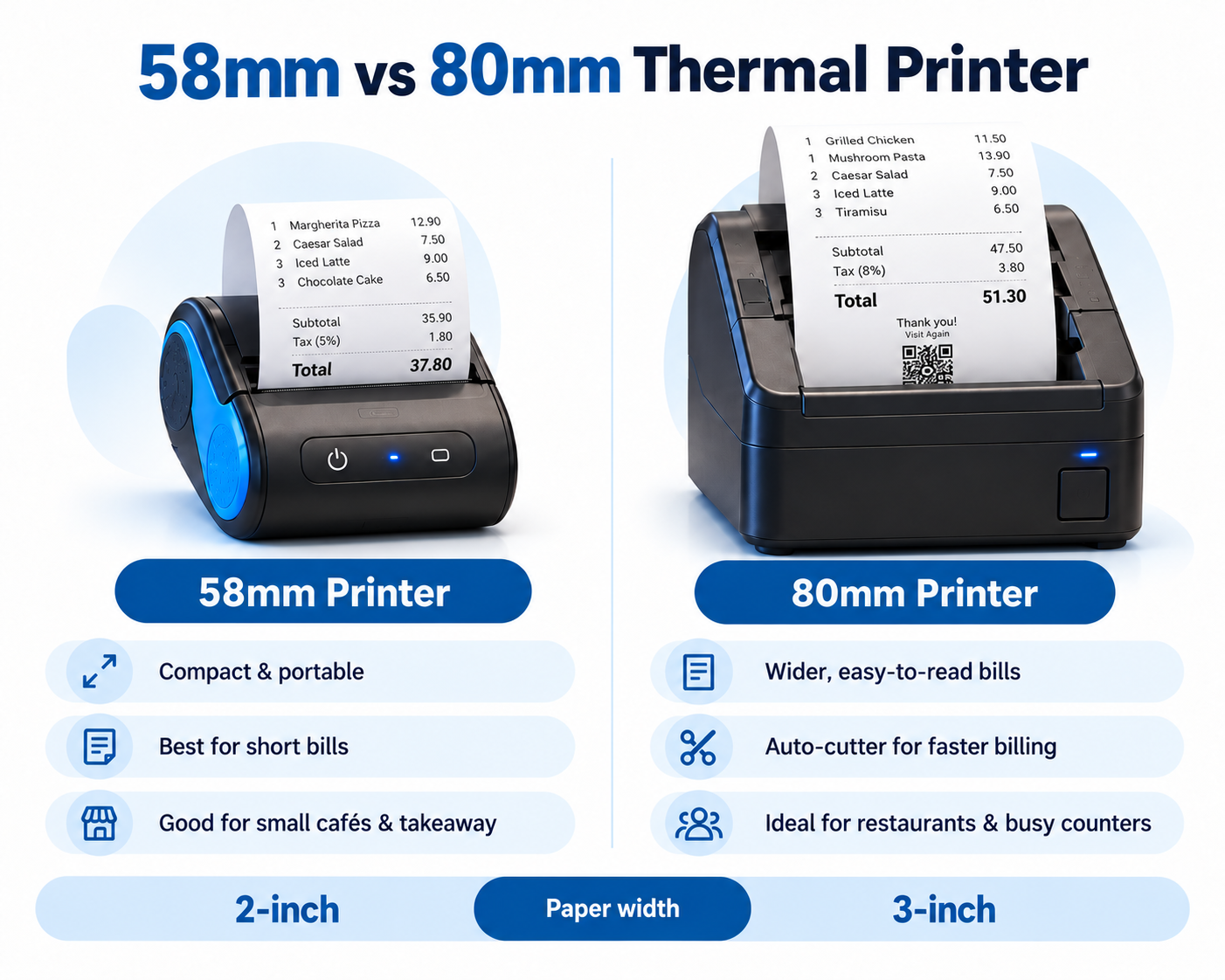
| Feature | 58mm Printer | 80mm Printer |
|---|---|---|
| Paper width | 58mm | 80mm |
| Receipt appearance | Narrow and compact | Wider and easier for detailed bills |
| Long food item names | More line wrapping | Usually less wrapping |
| GST details | Possible with a suitable layout | More room for tax breakdowns |
| Portability | Many compact choices | Commonly used on counters |
| Auto-cutter | Depends on model | Available on selected models |
| Suggested use | Tea stalls, food trucks and small counters | Dine-in restaurants and busy counters |
Real example: "Paneer Butter Masala – Full" may wrap across multiple lines on a narrow receipt, especially when the bill includes quantity and rate. A wider 80mm receipt gives your POS layout more horizontal room.
When Should You Choose a 58mm Printer?
A 58mm thermal printer is useful when your business mainly prints short receipts containing a limited number of items.
- Small cafés and takeaway counters
- Tea stalls and food trucks
- Businesses with limited counter space
- Mobile billing with supported Bluetooth devices
When Should You Choose an 80mm Printer?
An 80mm thermal printer provides more horizontal space for detailed receipts, longer food item names, quantities and applicable tax information.
- Dine-in family restaurants
- Cloud kitchens handling detailed orders
- Restaurants printing itemized GST bills
- Busy billing counters requiring faster receipt handling
Remember: Paper width and printing speed are different specifications. An 80mm printer only has an auto-cutter if that particular model includes one.
Which Thermal Printer Is Best for Your Restaurant?
The best restaurant billing printer depends on your business type, order volume and receipt requirements. A small takeaway shop does not necessarily need the same printer as a high-volume restaurant.
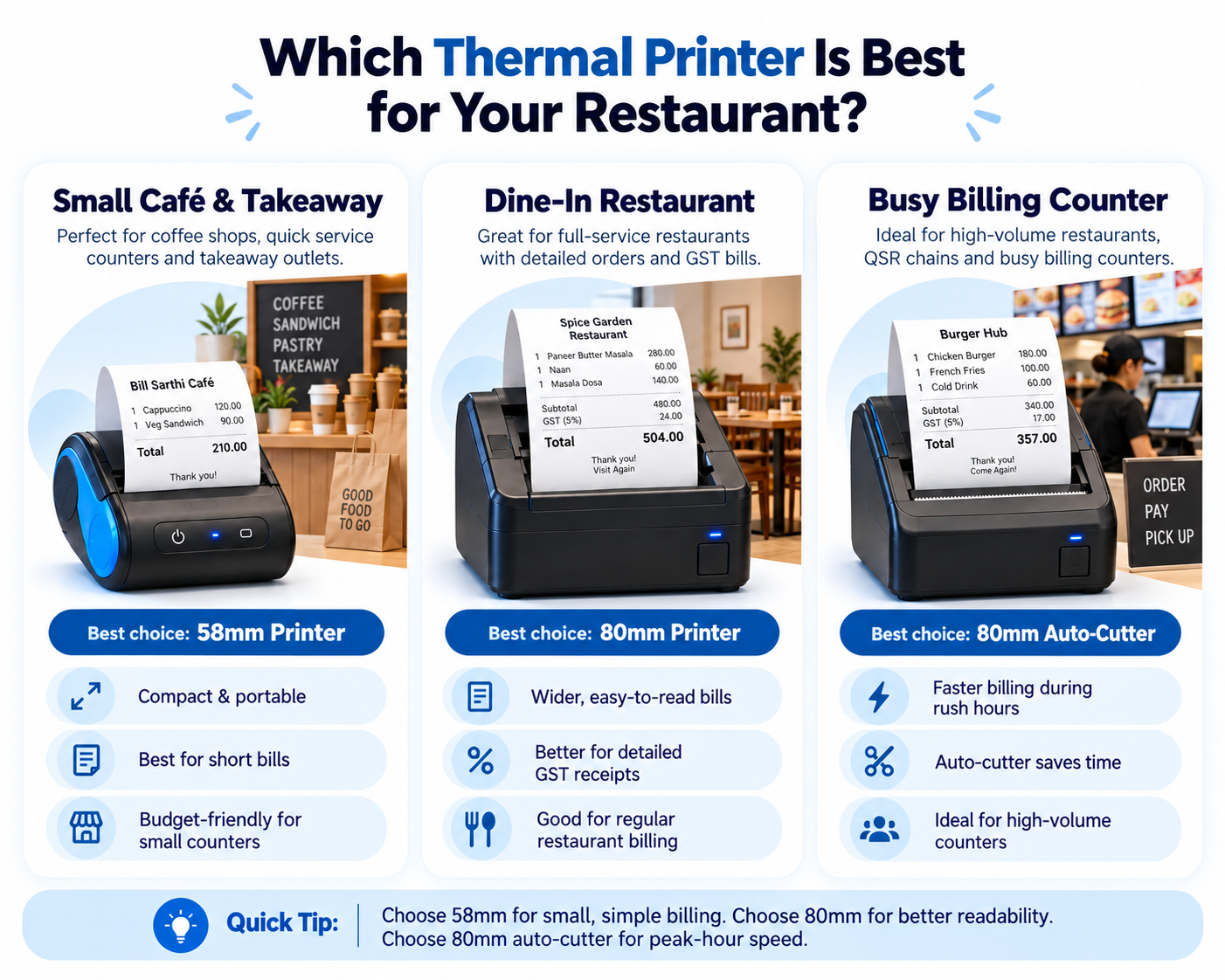
| Restaurant Type | Recommended Printer | Reason |
|---|---|---|
| Tea stall or snack counter | 58mm | Short receipts and compact design |
| Small takeaway outlet | 58mm or 80mm | Depends on order details |
| Café | 58mm or 80mm | Depends on menu and receipt length |
| Dine-in restaurant | 80mm | Detailed itemized billing |
| Cloud kitchen | 80mm | Detailed takeaway and delivery orders |
| Busy restaurant counter | 80mm with auto-cutter | Convenient receipt handling during peak hours |
Practical recommendation: Choose 58mm if portability and short bills are your main requirements. Choose standard 80mm for detailed restaurant billing. Choose an 80mm auto-cutter model when frequent receipt printing makes manual paper tearing inconvenient.
Thermal Printer Price in India: Bill Sarthi Printer Options
The price of a restaurant billing printer depends on paper width, printing speed, connectivity, portability and features such as automatic cutting.
Bill Sarthi offers 2-inch and 3-inch Bluetooth receipt printers for different restaurant billing requirements.
| Printer | Listed Price | Suitable For |
|---|---|---|
| 2-Inch Bluetooth Thermal Printer (58mm) | ₹2,300 | Small cafés and takeaway counters |
| 3-Inch Bluetooth Thermal Printer (80mm, normal speed) | ₹4,500 | Regular restaurant billing |
| 3-Inch Bluetooth Thermal Printer (80mm, high speed + auto-cutter) | ₹5,500 | Busy billing counters |
Prices reflect Bill Sarthi shop listings as of October 2026 and may change. Check the product pages for current prices, availability and compatibility.
2-Inch Bluetooth Thermal Printer – ₹2,300
Compact 58mm receipt printer for small cafés, takeaway counters and businesses with simple billing requirements.
3-Inch Bluetooth Thermal Printer – ₹4,500
Standard 80mm receipt printer for restaurants that need wider, more readable and detailed customer bills.
3-Inch Auto-Cutter Thermal Printer – ₹5,500
High-speed 80mm Bluetooth printer with an automatic paper cutter, ideal for restaurants handling frequent customer bills.
Not Sure Which Printer to Buy?
Compare all available Bill Sarthi printer models before purchasing. Check operating-system and POS compatibility for your exact setup.
Bluetooth vs USB vs Wi-Fi vs LAN Thermal Printers
Paper size is not the only important feature. The way your printer connects to your billing system also affects installation and daily use.
Bluetooth Thermal Printer
Convenient for supported Android phones and tablets without a printer data cable. Pairing does not automatically guarantee billing app compatibility.
USB Thermal Printer
Suitable for fixed computers where compatible drivers and POS software can print to a directly connected device.
Wi-Fi Thermal Printer
Useful for supported wireless-network printing, provided the POS application supports the printer's network-printing method.
LAN Thermal Printer
Often used for fixed kitchen or billing-counter setups where supported devices communicate through an Ethernet network.
Important: Check Printer Compatibility Before Buying
Not every Bluetooth thermal printer works with every restaurant billing application. Check the printer model, operating system, connection type, printing commands and supported receipt sizes before purchasing.
A printer advertised as Android-compatible is not automatically compatible with Windows, macOS or iPhone.
How to Connect a Bluetooth Thermal Printer to Android
Many restaurant owners use Android-based billing apps with Bluetooth thermal printers. The setup generally involves powering on the printer, pairing it with the phone, selecting it in the billing app and printing a test receipt.
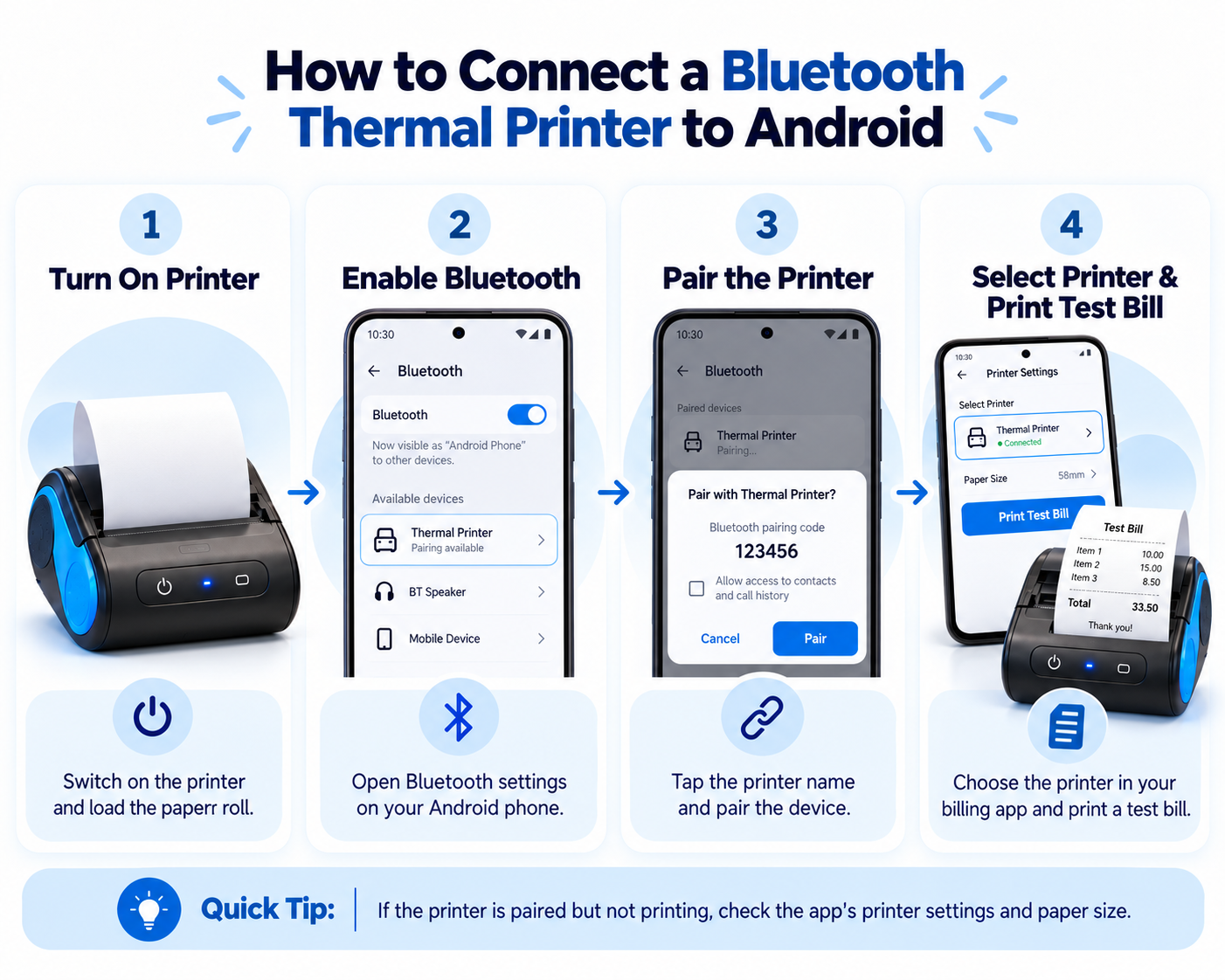
Follow these general steps for a compatible Android thermal printer. Actual menu names may vary depending on the Android version, printer model and billing application.
Turn On the Thermal Printer
Charge the portable printer or connect its power adapter. Switch it on and check that the device is ready.
Load the Correct Paper Roll
Insert the paper size supported by your printer, such as 58mm or 80mm. Make sure the heat-sensitive printing side faces the printhead as instructed by the manufacturer.
Enable Bluetooth on Android
Open the Bluetooth settings on your Android phone and search for available devices.
Pair Your Thermal Printer
Select the correct printer and follow its pairing instructions. If a PIN is required, use the code provided in the printer manual.
Select the Printer in Your Billing App
Open your restaurant billing application and locate its printer settings. Select the paired printer and configure the correct paper width, where supported.
Print a Test Bill
Generate a sample bill to check item names, rupee symbols, quantities, tax details, alignment and receipt cut-off.
Quick Tip: If your Bluetooth printer is paired but not printing, confirm that the same printer is selected inside the billing application. Also check the receipt paper-size setting.
For Bill Sarthi users, follow the printer setup instructions supplied for your supported printer model and app version.
How to Set Up a Thermal Printer on Windows
If your restaurant uses Windows billing software, the thermal printer must support your computer's operating system and printing method.
- Connect the printer using its supported USB or network interface.
- Install the correct manufacturer driver if required.
- Open Windows printer settings and confirm that the printer is available.
- Configure the supported receipt paper width and margins.
- Print a Windows test page to check communication.
- Select the printer in your supported POS or browser-print workflow.
- Print a sample customer bill and check the layout.
Important: A Bluetooth printer designed for Android mobile billing may not support Windows printing. Confirm compatibility before purchasing.
Can a 58mm or 80mm Thermal Printer Print GST Bills?
Yes. Both 58mm and 80mm thermal printers can print GST-related billing information when the POS software generates the required details and the printer supports the receipt layout.
A restaurant tax invoice may include the restaurant name, address, GSTIN, invoice number, date, food items, taxable amount and applicable tax details, depending on the relevant legal requirements.
A 58mm printer can accommodate tax details using a compact receipt layout. An 80mm printer generally provides more space for itemized invoices and tax breakdowns.
Does an 80mm Printer Make a Bill GST-Compliant?
No. GST compliance depends on the invoice details and applicable legal requirements, not the printer's paper size. The billing software and invoice configuration must provide the necessary information.
Read our complete guide: Restaurant GST Bill Format in India .
KOT Printer vs Customer Billing Printer: What's the Difference?
A kitchen order ticket (KOT) and a customer bill are different documents used during restaurant operations.
A KOT communicates food preparation instructions to kitchen staff, while a customer bill displays the charges associated with an order.
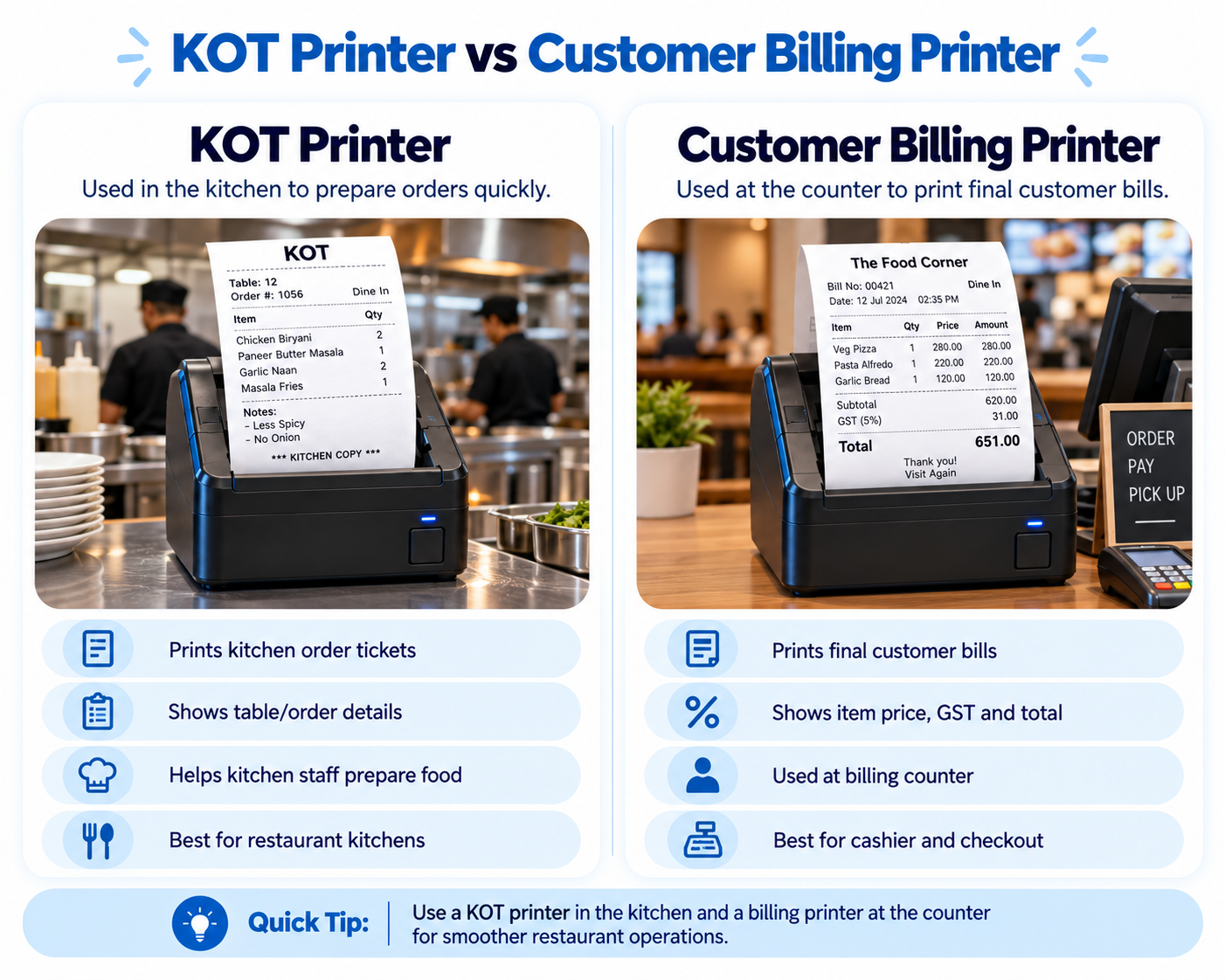
Kitchen Order Ticket (KOT)
A KOT tells kitchen staff which dishes need to be prepared and may include:
- Table number or order ID
- Food item names
- Quantities
- Special cooking instructions
- Order time
Customer Billing Receipt
A customer receipt displays billing information and may include:
- Restaurant details
- Invoice number and date
- Ordered items and quantities
- Item prices and taxes
- Final amount payable
Can One Printer Print Both KOT and Customer Bills?
It may be possible if the printer and POS software support both workflows. However, separate printers can be more practical when the kitchen and billing counter operate independently.
For example, a dine-in restaurant may use one printer at the cashier counter and another in the kitchen. Kitchen staff can then receive order tickets without depending on the billing counter.
To understand the restaurant KOT process, read: What Is KOT in a Restaurant?
Common Thermal Printer Problems and Fixes
Even a compatible restaurant billing printer may occasionally experience connectivity or receipt-printing issues. The following problems are among the most common.
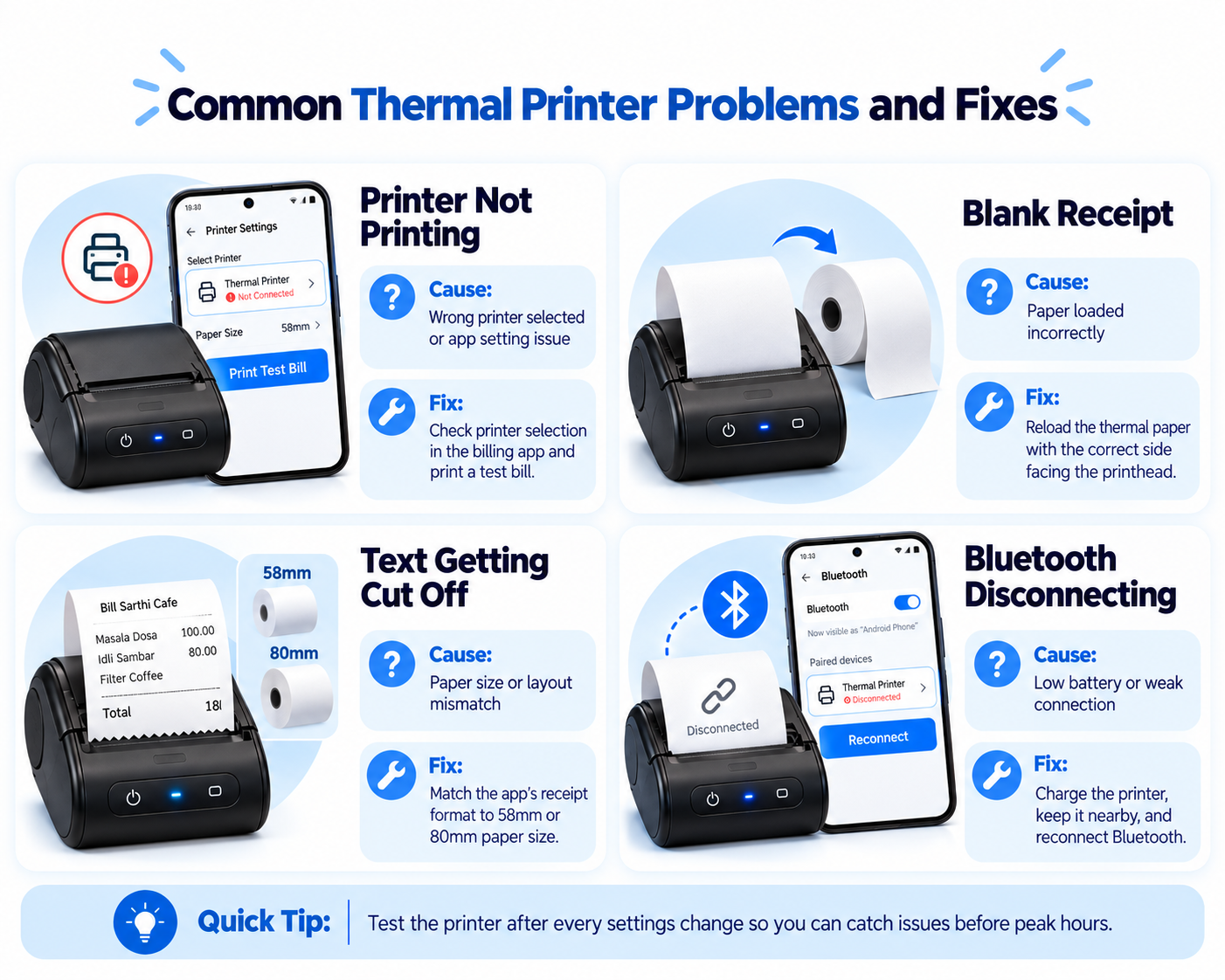
1. Bluetooth Connected but Not Printing
Possible cause: The printer is paired with Android but not selected inside the POS app.
Fix: Check printer selection, required permissions and active connections. Then print a test bill.
2. Thermal Printer Printing Blank Paper
Possible cause: Incorrect paper orientation or incompatible receipt paper.
Fix: Reload the recommended thermal paper with the correct side facing the printhead.
3. Receipt Text Getting Cut Off
Possible cause: The receipt layout or paper-width setting does not match the printer.
Fix: Match the POS receipt template to 58mm or 80mm paper and review margins and font size.
4. Bluetooth Printer Disconnecting
Possible cause: Low battery, excessive distance, interference or connection instability.
Fix: Charge the printer, keep it nearby and reconnect Bluetooth.
5. Thermal Printer Printing Slowly
Possible cause: Hardware printing speed, large receipt images or complex bill formatting.
Fix: Try a simplified receipt layout and compare the results before replacing the printer.
6. Rupee Symbol or Hindi Text Missing
Possible cause: Unsupported character encoding, font or printing method.
Fix: Check character-set support and test regional-language printing with your billing app.
Quick Tip: Test your thermal printer after changing paper-size or connectivity settings. Identifying problems before restaurant peak hours can help avoid interruptions during billing.
Thermal Printer Buying Checklist for Restaurant Owners
Before purchasing a thermal printer for restaurant billing, check the following:
- Paper width: Do you need 58mm or 80mm receipts?
- Billing device: Are you using Android, Windows or another supported platform?
- Connectivity: Do you need Bluetooth, USB, Wi-Fi or LAN?
- POS compatibility: Does your billing app support the exact printer model?
- Printing speed: How many bills will you print during busy hours?
- Auto-cutter: Would automatic receipt cutting save time at your counter?
- Paper availability: Are compatible thermal paper rolls easily available?
- Warranty and support: What support does the seller provide?
Selecting a compatible printer based on your actual billing requirements is more important than choosing a device only because of its low price.
Frequently Asked Questions About Restaurant Thermal Printers
Which thermal printer is best for restaurant billing?
A compatible 58mm printer can be sufficient for small food outlets with short receipts. An 80mm printer is generally better for detailed bills, while an auto-cutter model can improve receipt handling at busy counters.
What is the difference between a 58mm and an 80mm thermal printer?
The main difference is paper width. A 58mm printer produces narrower receipts, while an 80mm printer provides more space for food item names, quantities, prices and applicable tax details.
Is a 58mm or 80mm printer better for GST billing?
Both can print tax information with a suitable billing layout. An 80mm printer generally offers more space for detailed invoices and tax breakdowns.
Does a thermal receipt printer require ink?
No. Direct thermal receipt printers use heat-sensitive paper and do not require ink cartridges or toner.
Can I connect a Bluetooth thermal printer to an Android phone?
Yes, if the Android phone, printer and billing application support the required Bluetooth printing method. Pair the printer, select it inside the compatible app and print a test receipt.
Can a Bluetooth printer print without internet?
Bluetooth communication itself normally does not require internet access. However, your restaurant POS application may require internet connectivity for certain operations.
Can one thermal printer print KOTs and customer bills?
Yes, if the billing software and printer support that workflow. Larger restaurants may benefit from using separate printers for kitchen orders and customer billing.
Is an auto-cutter necessary for restaurant billing?
No. However, an auto-cutter reduces manual receipt tearing and can make billing more convenient during busy restaurant hours.
Can I put 80mm thermal paper in a 58mm printer?
No. A printer designed for 58mm paper cannot accommodate a standard 80mm roll. Always use a paper size supported by your printer.
What is the price of a thermal printer at Bill Sarthi?
As listed in October 2026, Bill Sarthi offers a 58mm Bluetooth printer for ₹2,300, a standard 80mm Bluetooth printer for ₹4,500 and an 80mm high-speed auto-cutter printer for ₹5,500. Check the online shop for current prices.
Choosing the Right Thermal Printer for Your Restaurant
A 58mm thermal printer is a practical starting point for small cafés, tea stalls and takeaway businesses that mainly print short receipts.
An 80mm thermal printer provides more space for detailed itemized bills and is generally better suited to dine-in restaurants and larger orders.
For high-volume billing counters, an 80mm printer with an auto-cutter can make receipt handling more convenient by automatically cutting bills after printing.
Before purchasing, verify printer compatibility with your restaurant billing software and choose the model that matches your daily operations.
Buy Restaurant Billing Thermal Printers From Bill Sarthi
Explore 58mm portable Bluetooth printers, 80mm receipt printers and high-speed 80mm auto-cutter models for your restaurant billing needs.
Shop Thermal Printers Explore Bill Sarthi POS Software