Running a restaurant involves much more than preparing food and serving customers. Behind the scenes, restaurant owners must manage employees, monitor attendance, organize working shifts, calculate salaries and maintain accurate payment records.
Imagine it's the end of the month at a busy restaurant. Your chef took two days off, a waiter worked extra hours during the weekend rush, one cashier received a salary advance, and another employee joined halfway through the month.
Now it's time to calculate everyone's salary. But some attendance entries are missing, overtime details are written in a separate notebook, and salary advances were recorded on WhatsApp.
For small restaurants, cafés, dhabas and quick-service outlets, these situations can create unnecessary confusion.
This is where restaurant payroll management and organized staff attendance records become important.
A structured attendance and payroll process helps restaurant owners keep employee records organized, reduce calculation mistakes and prepare salary payments more accurately.
In this guide, we'll explain common restaurant attendance challenges, how salary calculations work, how to handle absences and overtime, and how digital staff management tools can simplify administrative work.
Quick Answer: How Can Restaurants Manage Staff Attendance and Payroll?
Restaurants can manage attendance and payroll by maintaining accurate employee records, recording daily attendance, verifying leaves and working hours, reviewing salary adjustments, and preparing payments according to applicable employment terms and legal requirements.
Digital attendance and payroll software can make these administrative records easier to organize and review.
What Is Restaurant Staff Attendance and Payroll Management?
Restaurant staff attendance management is the process of recording when employees work, remain absent, take approved leave or complete scheduled shifts.
Restaurant payroll management involves calculating, reviewing and recording employee salaries using agreed compensation, attendance information, applicable adjustments and other payment details.
Attendance Management
- Daily employee attendance
- Present and absent records
- Approved leaves
- Working-hour records
- Missing attendance entries
Payroll Management
- Monthly salary details
- Attendance-related adjustments
- Applicable overtime payments
- Salary advances and permitted deductions
- Final salary payable
Although these processes are connected, they serve different purposes.
Attendance records help verify employee working time, while payroll records help determine and document compensation.
Why Is Managing Restaurant Staff Attendance and Payroll Difficult?
Restaurants often operate during weekends, holidays, evenings and late-night hours. Employees may work different shifts, and staffing requirements can change depending on customer demand.
1. Missing Attendance Records
Attendance registers may not be updated daily. Missing entries make it difficult to verify how many days an employee actually worked.
2. Different Working Shifts
Chefs, waiters and cashiers may work different schedules, making it harder to track assigned and actual working hours.
3. Salary Calculation Confusion
Unpaid absences, joining dates, different salary arrangements and missing records can complicate payroll.
4. Unrecorded Overtime
Staff may work additional hours during busy periods. Without records, extra working time can be overlooked.
5. Salary Advances
Advances recorded in separate notebooks or messages can create confusion when preparing final payments.
6. Scattered Employee Records
Attendance, leave details, salary calculations and payment records may be maintained in different places.
Practical solution: Establish a consistent daily attendance process and verify employee records before monthly payroll preparation.
How to Manage Restaurant Staff Attendance Step by Step
A reliable attendance process does not need to be complicated. The most important thing is to record employee information consistently.
Maintain Employee Records
Record employee names, job roles, joining dates, assigned shifts and agreed salary details.
Record Attendance Every Day
Maintain daily attendance records. Depending on the restaurant's policies, distinguish between present, absent, leave, weekly off and other statuses.
Verify Missing or Incorrect Entries
Review missing attendance entries, unexpected absences and corrections before finalizing records.
Maintain Working-Hour Records
Keep accurate information about actual working hours and approved additional time. Apply relevant overtime rules where required.
Review Monthly Attendance Summary
Verify attendance categories before preparing employee salaries.
Example Restaurant Attendance Summary
| Attendance Category | Example Days |
|---|---|
| Days in payroll period | 30 |
| Present | 24 |
| Approved paid leave | 2 |
| Weekly offs | 3 |
| Unpaid absence | 1 |
| Total | 30 |
This is an illustrative attendance summary. Actual leave and payroll treatment depends on employment terms and applicable rules.
Restaurant Staff Attendance Tracking in Bill Sarthi Web App
Bill Sarthi's web version includes a staff attendance dashboard to help restaurant owners review employee attendance information.
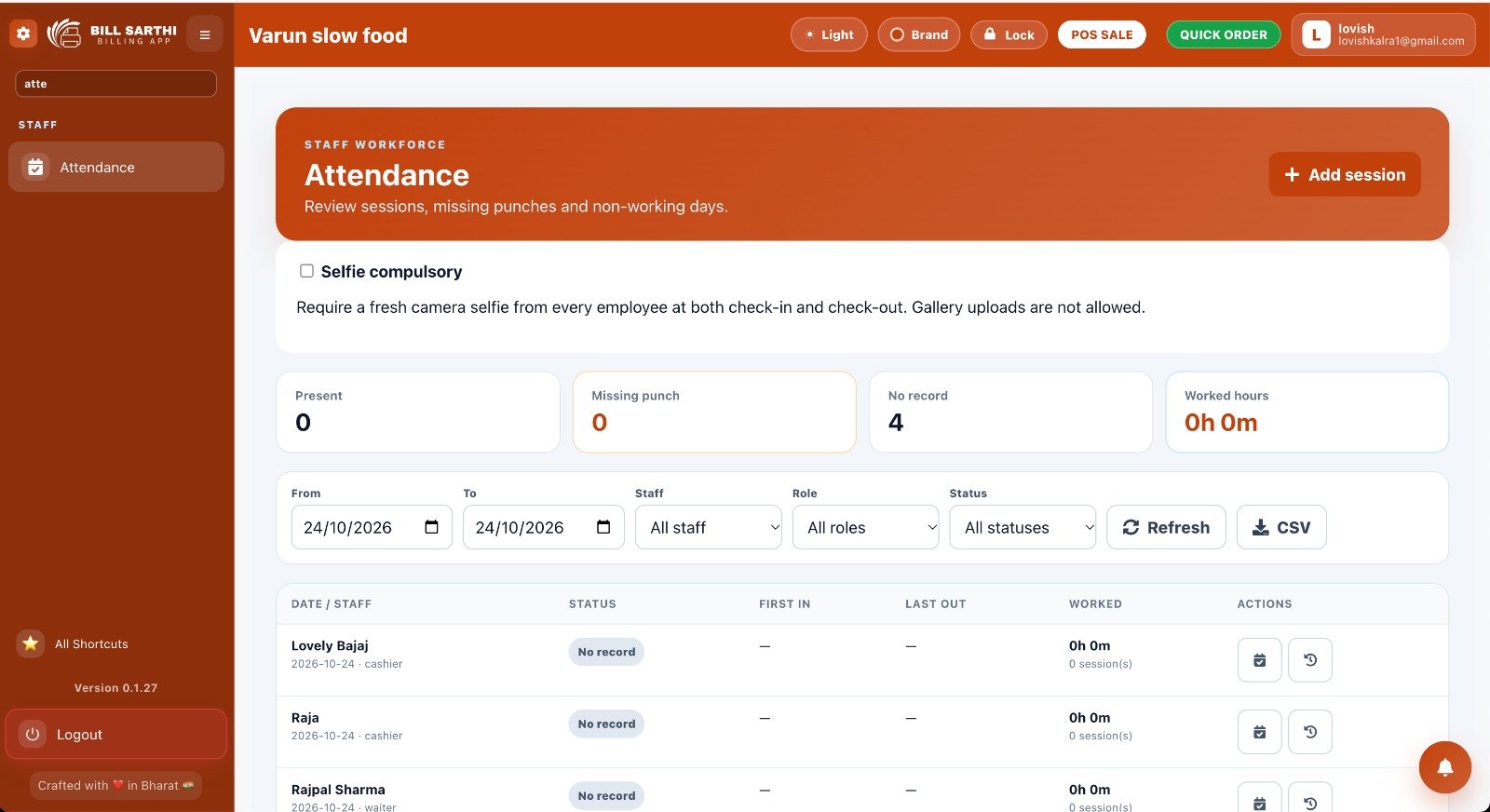
The attendance dashboard displays useful information such as:
- Present employee count
- Missing punch records
- Employees without attendance records
- Recorded worked hours
- Employee-wise attendance details
- First check-in and last check-out details
- Date, staff, role and status filters
- CSV export option
Selfie-Based Attendance Verification
The dashboard also displays a Selfie Compulsory setting.
When enabled, this setting requires employees to capture a fresh camera selfie during check-in and check-out. Gallery uploads are not allowed under this setting.
This can help restaurants maintain an additional verification step for employee attendance records.
Availability: The staff attendance functionality shown here is part of the Bill Sarthi web version. Features and permissions may vary with the account configuration.
How to Calculate Restaurant Staff Salary Based on Attendance
Salary calculation is an important part of restaurant payroll management.
Before calculating payment, restaurant owners should understand the employee's agreed compensation, applicable salary basis, leave treatment and other required adjustments.
Example: Attendance-Based Salary Calculation
| Description | Example Amount |
|---|---|
| Agreed monthly salary | ₹18,000 |
| Illustrative calculation divisor | 30 days |
| Unpaid absences | 2 days |
| Salary advance to adjust | ₹2,000 |
Step-by-Step Salary Calculation
Step 1: Daily salary rate
₹18,000 ÷ 30 = ₹600Step 2: Unpaid absence adjustment
₹600 × 2 = ₹1,200Step 3: Salary after absence adjustment
₹18,000 − ₹1,200 = ₹16,800Step 4: Adjust recorded salary advance
₹16,800 − ₹2,000 = ₹14,800Important: This example assumes an employment arrangement permitting the illustrated 30-day calculation and advance adjustment. It is not a universal payroll formula. Actual calculations may require different rules, contributions, earnings or deductions.
How to Manage Restaurant Staff Overtime, Leaves and Salary Advances
Managing Overtime
Restaurants may require additional working hours during weekends, festivals and other busy periods.
Record the actual working time and any necessary approvals. Applicable overtime eligibility and payment rates should be determined under relevant employment rules.
Managing Employee Leaves
Maintain clear records for:
- Approved paid leave
- Approved unpaid leave
- Unplanned absences
- Weekly offs
- Applicable holidays
Not every absence results in a salary deduction. Leave treatment should follow applicable entitlements and employment arrangements.
Managing Salary Advances
When an employee receives an advance, maintain the amount, date, approval and agreed adjustment details.
This can help prevent payment confusion during monthly payroll preparation.
Maintaining Employee Payment Records
After payroll approval, maintain a record of salary payments, payment dates and relevant adjustments.
Manual Attendance Register vs Digital Attendance and Payroll Management
Many restaurants initially use paper registers and spreadsheets for employee administration.
These methods can work when maintained carefully. However, administrative effort may increase as the restaurant team grows.
| Area | Manual Records | Digital System |
|---|---|---|
| Employee details | Register or spreadsheet | Organized digital records |
| Daily attendance | Manual entries | Software-based recording |
| Working-hour records | Manual calculation | Depends on available tracking tools |
| Attendance history | Searching old records | Depends on software history features |
| Salary calculation | Manual formulas | Depends on payroll functionality |
| Monthly reports | Manually prepared | May be generated within software |
Digital tools do not automatically eliminate errors. Correct employee information, accurate attendance and proper payroll settings remain important.
Benefits of Digital Restaurant Staff Attendance and Payroll Management
1. Organized Employee Records
Maintain employee-related information using a more consistent administrative process.
2. Easier Attendance Review
Review recorded attendance without searching through multiple handwritten registers.
3. Improved Salary Transparency
Maintain clearer records of attendance-related adjustments and employee payment calculations.
4. Better Month-End Preparation
Follow a consistent process for verifying staff records before preparing payroll.
5. Reduced Administrative Confusion
Structured records may reduce dependence on disconnected notebooks, spreadsheets and messages.
6. Easier Record Verification
Access to organized information can make payroll questions and attendance corrections easier to review.
Restaurant Payroll Management in Bill Sarthi Web App
Bill Sarthi's web version also provides a staff payroll dashboard for restaurant employee salary administration.
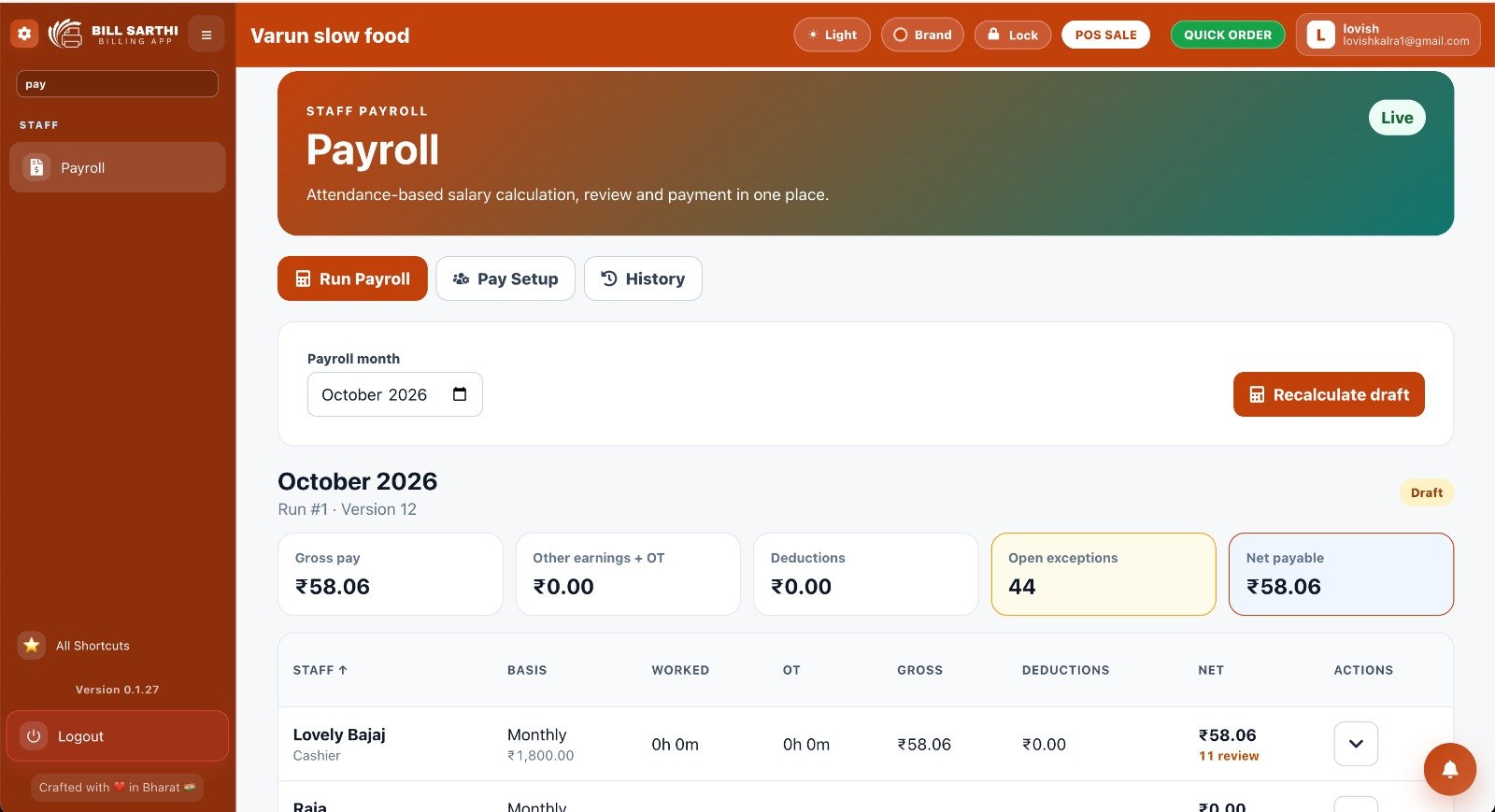
The payroll screen includes attendance-based salary calculation, review and payment-related workflows.
Payroll Dashboard Features
- Payroll month selection
- Run Payroll section
- Pay Setup section
- Payroll History section
- Gross pay summary
- Other earnings and overtime summary
- Deductions summary
- Net payable amount
- Open exceptions count
- Employee-wise payroll details
- Draft payroll recalculation option
Attendance-Based Salary Calculation
The payroll interface identifies attendance-based salary calculation as part of its workflow.
This allows restaurant owners to review the available payroll information alongside recorded staff attendance.
Gross Pay, Deductions and Net Payable
The dashboard displays payroll summary fields such as gross pay, other earnings and overtime, deductions and net payable.
These summaries help users review salary calculations before completing the applicable payroll process.
Payroll Draft and Review
The interface also includes draft payroll information, exception counts and a recalculation option.
Restaurant managers should review payroll exceptions and confirm employee payment details before approving salary payments.
Important: The screenshot demonstrates the Bill Sarthi web-version payroll interface. Exact supported calculations, payment workflows and permissions should be confirmed for the selected account.
Common Restaurant Payroll Mistakes and How to Avoid Them
1. Unverified Attendance
Salary calculations based on incomplete attendance can produce incorrect results.
Better approach: Verify attendance before payroll preparation.
2. Incorrect Leave Treatment
Treating every absence as unpaid can result in inappropriate adjustments.
Better approach: Check applicable leave rules.
3. Forgotten Salary Advances
Advances not recorded properly can create payment confusion.
Better approach: Maintain documented advance records.
4. Incorrect Calculation Basis
A calculation formula may not match the employee's applicable salary terms.
Better approach: Apply the correct payroll basis.
5. Missing Overtime Records
Unrecorded extra working hours can create disagreements.
Better approach: Record actual working time.
6. Missing Payment Records
Incomplete salary payment documentation can make later verification difficult.
Better approach: Maintain clear payment confirmations.
Restaurant Staff Payroll Checklist for Month-End
A simple monthly checklist can help restaurant owners maintain a consistent payroll process.
- Verify employee records: Check salary terms and current staff details.
- Review daily attendance: Confirm missing entries and relevant absences.
- Check approved leaves: Distinguish paid and unpaid leave correctly.
- Review working hours: Confirm applicable overtime information.
- Check salary advances: Review approved and permitted adjustments.
- Review salary calculations: Apply the relevant compensation rules.
- Verify payroll exceptions: Resolve incomplete or disputed entries.
- Record salary payments: Maintain appropriate payment documentation.
Important Features to Look for in Restaurant Attendance and Payroll Software
Not every attendance or payroll application provides the same functionality. Restaurant owners should compare software with their actual staffing requirements.
| Feature to Evaluate | Why It Matters |
|---|---|
| Employee record management | Maintains organized staff details |
| Attendance tracking | Records employee attendance |
| Attendance corrections | Supports review of incorrect entries |
| Leave records | Helps distinguish absence categories |
| Working-hour tracking | Supports review of actual hours |
| Payroll calculation | Supports salary preparation |
| Overtime handling | Supports applicable extra-hour payments |
| Advance records | Helps maintain salary adjustment details |
| Payroll reporting | Supports salary review |
| Access permissions | Helps protect employee information |
This is a general software-selection checklist. Exact features must be verified in the selected product.
How Bill Sarthi Helps With Restaurant Staff Attendance and Payroll
Restaurant owners already manage customer billing, table orders, kitchen preparation and sales records.
Employee attendance and payroll administration add another important responsibility.
Bill Sarthi Web App includes attendance and payroll functionality for restaurant staff management.
Staff Attendance Dashboard
Review employee attendance sessions, missing punches, worked hours and attendance records.
Selfie Attendance Setting
The available selfie verification setting can require fresh camera captures at employee check-in and check-out.
Attendance-Based Payroll
The payroll dashboard provides an attendance-based salary calculation and review workflow.
Payroll Summaries
Review displayed gross pay, other earnings and overtime, deductions and net payable amounts.
Payroll History
Access the available Payroll History area within the web-version interface.
Draft Review
Review payroll drafts, open exceptions and the available recalculation option.
Other Restaurant Management Features
Alongside attendance and payroll, Bill Sarthi provides restaurant operations features such as:
- Restaurant billing
- Dine-in and takeaway order management
- Restaurant table management
- Kitchen Order Ticket generation
- Inventory management
- Sales reporting
This makes the Bill Sarthi Web App relevant for restaurant owners exploring organized billing and staff administration workflows.
Product availability: Attendance and payroll features are currently available in the Bill Sarthi web version. Restaurant owners can explore the available tools through the web application.
Which Restaurants Benefit From Attendance and Payroll Management?
Small Restaurants
Owners can establish a consistent process for attendance and monthly salary records.
Cafés and Coffee Shops
Manage attendance administration for baristas, cashiers and service staff.
Family Restaurants
Maintain organized records for kitchen employees, waiters and counter staff.
Quick-Service Restaurants
Review employee attendance across operating shifts.
Dhabas
Maintain employee attendance and salary information for extended operating schedules.
Multi-Outlet Restaurants
Establish consistent staff administration procedures across locations. Confirm any multi-outlet functionality required in your software.
Frequently Asked Questions
1. What is restaurant payroll management?
Restaurant payroll management is the process of calculating, reviewing, recording and paying employee compensation based on agreed salary terms, attendance information and applicable adjustments.
2. Why is attendance important for restaurant payroll?
Attendance records help verify working days, absences, approved leave and relevant working-hour information. These details may affect salary calculations depending on employment terms.
3. How can restaurants manage staff attendance?
Restaurants can maintain consistent attendance records using registers, spreadsheets or suitable digital systems. Entries should be recorded regularly and verified when necessary.
4. How is restaurant staff salary calculated?
Salary calculations depend on agreed compensation, the applicable salary basis, attendance-related adjustments, additional earnings and required deductions or contributions.
5. Can restaurants calculate salaries based on attendance?
Yes, where attendance-based adjustments are permitted under applicable employment terms and legal requirements. Calculation methods differ by arrangement.
6. How should restaurants manage employee overtime?
Restaurants should maintain accurate working-hour records and apply the overtime eligibility and payment rules applicable to their employees.
7. How can restaurants avoid payroll mistakes?
Verify attendance, maintain employee records, review approved adjustments, check calculations and preserve salary payment documentation.
8. Is attendance management useful for small restaurants?
Yes. Small restaurants can benefit from accurate attendance records, especially when employees work different shifts.
9. What is the difference between attendance and payroll software?
Attendance software focuses on employee attendance and working-time records. Payroll software focuses on salary calculations and compensation administration.
10. Can digital payroll software eliminate salary errors?
No software can guarantee error-free payroll. Accurate records, appropriate configuration and verification are still necessary.
11. Does Bill Sarthi offer attendance and payroll?
Yes. Bill Sarthi provides attendance and payroll functionality in its web version. Exact features depend on the available product configuration.
12. Is Bill Sarthi attendance and payroll available in the mobile app?
Attendance and payroll functionality is currently available in the Bill Sarthi web version. Availability in other versions should be confirmed through official product information.
Conclusion: Make Restaurant Attendance and Payroll Management More Organized
Restaurant owners have several daily responsibilities, from managing customer orders and kitchen operations to maintaining employee records and paying salaries.
When attendance and payroll information is incomplete or scattered across different documents, month-end salary preparation can become difficult.
A structured restaurant staff attendance and payroll management process helps maintain clearer records, review salary information and reduce avoidable administrative mistakes.
Whether you operate a small café, family restaurant, dhaba or growing restaurant business, maintaining accurate employee records is an important part of daily operations.
Bill Sarthi's web-version attendance and payroll tools give restaurant owners a way to explore staff management alongside restaurant billing workflows.
Manage Restaurant Staff Attendance and Payroll With Bill Sarthi
Explore the Bill Sarthi Web App for attendance tracking, payroll review, restaurant billing, KOT management and more.
Try Bill Sarthi Web App – 3 Days Free Trial → Attendance and payroll are currently available in the Bill Sarthi web version. Trial access and included features are subject to the current offering.