Cloud Kitchen POS Software for Faster Billing & Better KOT Management
Wrong kitchen tickets, crowded takeaway counters and confusing stock records can slow down a busy cloud kitchen. Bill Sarthi helps you organize takeaway orders, generate KOTs, create bills and review sales from a restaurant-focused POS system.
- Takeaway order billing
- Kitchen Order Tickets
- Thermal receipt printing
- Inventory management
- GST billing
- Sales reporting
Explore the supported features and plans for your kitchen setup.
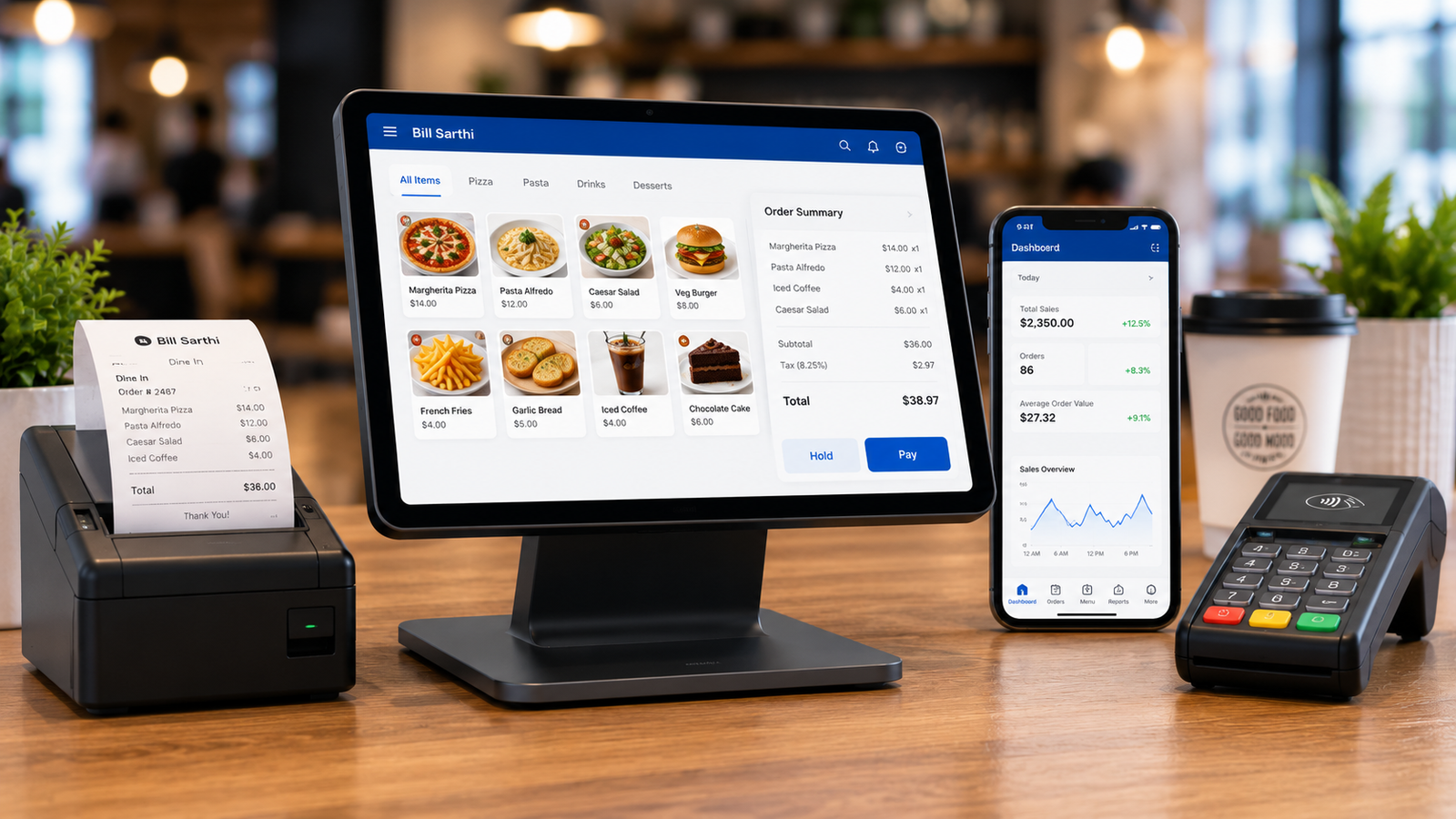
What Is Cloud Kitchen POS Software?
Cloud kitchen POS software helps food businesses record takeaway orders, communicate food requirements to kitchen staff, prepare customer bills and organize operational records.
Counter Order Management
Record food items and quantities in a consistent takeaway billing workflow.
Kitchen Communication
Generate Kitchen Order Tickets so staff have a clear reference for food preparation.
Billing & Records
Create itemized bills, record payments and review available sales information.
What Problems Do Cloud Kitchen Owners Face During Busy Hours?
A small mistake during a rush can affect food preparation, packaging and customer collection. Here are the problems that deserve attention first.
Wrong or Mixed-Up Orders
Similar food items from different customers can be confused when order references are unclear.
Missing Kitchen Instructions
Verbal communication and unclear handwritten slips can lead to incorrect quantities or missed preparation notes.
Slow Counter Billing
Manual price calculations and repeated item entry can increase waiting time at busy takeaway counters.
Unexpected Stock Shortages
When inventory records are not maintained, popular ingredients can run low without timely attention.
Incorrect Packing
Missing items and quantity mismatches can happen when prepared food is not checked against the order.
Unclear Daily Sales
Separate billing records make it harder for owners to review daily transactions and payment collections.
How Does a Cloud Kitchen POS Workflow Work?
The goal is to give every food order a clear reference from entry to completion. Here's a practical workflow for takeaway orders handled by the restaurant.
Enter Order
Record customer-selected food items and quantities.
Generate KOT
Prepare a kitchen ticket with the order details.
Prepare Food
Kitchen staff use the ticket to prepare the correct items.
Bill & Verify
Generate the bill and check food items before packaging.
Customer Pickup
Match the order reference and hand over the packed food.
Example: During a dinner rush, three customers order Veg Biryani. Clear order references and KOTs help kitchen staff distinguish the quantities and instructions for each order. Employees should still verify the prepared items before handover.
Reduce Kitchen Confusion With Clear KOTs
A Kitchen Order Ticket (KOT) communicates ordered items, quantities and relevant preparation instructions to kitchen staff.
For a busy cloud kitchen, a standardized ticket can be more reliable than depending only on verbal instructions.
- Clear food item names
- Correct item quantities
- Order identification
- Preparation notes where supported
- Consistent kitchen communication
Illustration only — actual KOT layouts depend on printer and software settings.
Essential Bill Sarthi Features for Cloud Kitchens
Focus on the functions that support everyday counter and kitchen operations, rather than adding unnecessary complexity.
Quick Takeaway Billing
Enter menu items and create customer bills through a structured POS workflow.
KOT Generation
Create kitchen tickets to communicate food preparation requirements.
Thermal Printing
Use compatible printers for receipts and supported KOT printing workflows.
Inventory Management
Maintain product and stock information, including available low-stock controls.
GST Billing
Prepare bills with configured tax details according to applicable requirements.
Sales Reports
Review available transaction summaries, item sales and other reporting information.
Plan guidance: Features such as KOT, printing, inventory and web-dashboard access vary by plan. Check the current Bill Sarthi pricing plans for the required configuration.
Why Cloud Kitchen Owners May Choose Bill Sarthi
Cloud kitchens need clear ordering, accurate kitchen communication, organized billing and useful sales records. Bill Sarthi brings these restaurant operations into a POS-focused workflow.
Less Manual Coordination
Structured orders and KOTs help staff work from consistent records.
Clearer Business Records
Review transactions and supported sales reports instead of relying only on separate handwritten books.
Web & Mobile Options
Explore supported Bill Sarthi web and mobile workflows according to your plan and device setup.
Explore Real Bill Sarthi POS Screens
Before choosing a cloud kitchen POS, check how the order-entry interface, billing screens, kitchen tickets and reports work in practice.
Bill Sarthi's official screenshots let you review the product interface before setting up your outlet.
- Review POS billing screens
- Explore the available KOT workflow
- Understand reporting interfaces
- Check relevant device options
Test a Real Takeaway Order
- Open the order-entry screen.
- Add multiple menu items.
- Check the takeaway order reference.
- Generate a sample KOT.
- Test your compatible printer.
- Prepare and review the final bill.
- Check the transaction in reports.
Manual Cloud Kitchen Operations vs POS Workflow
Manual methods can work for smaller volumes, but become harder to coordinate as the number of daily orders increases.
| Operation | Manual Method | POS-Based Method |
|---|---|---|
| Order entry | Handwritten notes | Structured digital entry |
| Kitchen communication | Verbal or handwritten slips | Generated KOTs |
| Billing | Manual totals or calculator | Itemized POS bills |
| Printing | Separate manual processes | Supported thermal printers |
| Stock visibility | Manual stock checks | Available inventory controls |
| Daily records | Registers and spreadsheets | Available sales reports |
Actual POS benefits depend on accurate entries, staff training, device compatibility and the selected plan.
What Do You Need to Set Up a Cloud Kitchen POS?
Choosing the right setup matters, especially when counter space, staff training and printing requirements are limited.
1. Compatible Device
Choose a supported phone, tablet or web-based setup for your counter.
2. Menu Setup
Configure your menu items, prices and applicable tax settings.
3. Thermal Printer
Select a compatible receipt or kitchen printer for your workflow.
4. Staff Training
Practice order entry, KOT generation, billing and customer pickup checks.
Printer tip: Choosing between 58mm and 80mm thermal printers depends on your receipt format, order volume and counter setup. Read our thermal printer buying guide before purchasing.
Which Bill Sarthi Plan Should a Cloud Kitchen Choose?
The right plan depends on your order volume, KOT requirements, printer setup, inventory needs and whether you want web-dashboard access.
Don't choose only on headline price. Confirm the specific capabilities required for your kitchen.
Before You Buy, Confirm:
- Is KOT included in the selected plan?
- Which thermal printers are compatible?
- Is inventory management included?
- Is the web dashboard included?
- What reporting features are available?
- How does billing behave without internet?
- Is your preferred device supported?
Features vary by plan and configuration. Check the current product offering.
6 Ways to Reduce Wrong Orders in a Cloud Kitchen
Software is only one part of the solution. A consistent operating routine is equally important.
Use Unique Order References
Make sure kitchen staff can identify which items belong to each customer.
Confirm Quantities
Verify item counts before sending the order for preparation.
Use KOTs Consistently
Train staff to follow the same kitchen-ticket process for every order.
Check Packed Food
Compare packed items with order details before customer collection.
Review Stock Regularly
Check ingredient availability before busy meal periods.
Reconcile Daily Sales
Compare recorded bills and payment collections at day-end.
Cloud Kitchen POS Software FAQs
Answers to common questions about cloud kitchen billing, KOT printing, devices and inventory.
What is cloud kitchen POS software?
Cloud kitchen POS software helps food businesses record customer orders, communicate with kitchen staff, generate bills and maintain transaction records.
Can Bill Sarthi be used for cloud kitchens?
Yes. Bill Sarthi provides restaurant POS functions such as takeaway billing, KOT generation, inventory management and sales reporting. Confirm the relevant plan before setup.
How does KOT help in a cloud kitchen?
A Kitchen Order Ticket provides a clear reference containing food items, quantities and applicable preparation notes. This helps reduce reliance on verbal kitchen instructions.
Can Bill Sarthi generate takeaway bills?
Yes. Bill Sarthi supports restaurant billing workflows suitable for takeaway transactions.
Does Bill Sarthi support thermal printing?
Bill Sarthi supports compatible thermal printing workflows for bills and KOTs. Printer model, connectivity, device and plan compatibility should be checked before purchase.
Can a cloud kitchen manage inventory in Bill Sarthi?
Bill Sarthi offers inventory management capabilities. Available stock controls and alerts depend on the chosen plan and configuration.
Can I use Bill Sarthi on web and mobile?
Bill Sarthi has web and mobile options. Supported workflows, access permissions and features depend on your setup and subscription plan.
Does Bill Sarthi work without internet?
Bill Sarthi advertises offline billing for supported configurations. Confirm which functions remain available without internet on your chosen device and plan, especially web-based functions.
How much does cloud kitchen POS software cost?
Pricing depends on the selected plan and required capabilities. Visit Bill Sarthi Pricing Plans for current information.
Can I try Bill Sarthi before purchasing?
Bill Sarthi offers a 3-day free trial. Visit the Bill Sarthi Web App to explore the available trial experience.
Make Cloud Kitchen Billing and KOT Management Simpler
Explore takeaway billing, kitchen tickets, inventory and reports with Bill Sarthi. Start with a 3-day free trial or request guidance for your setup.
Check plan availability, device compatibility and supported features before activation.