Offline Restaurant Billing Software for Android, iPhone, Windows, Mac & Web
Run your restaurant without interruptions, even when the internet goes down. Bill Sarthi keeps essential restaurant data available on your system so supported billing, KOT, table management and day-to-day workflows can continue locally.
When connectivity returns, relevant data can sync with the cloud again. Whether you manage a cafe, cloud kitchen, bakery, dhaba, food court or multi-outlet restaurant, Bill Sarthi combines offline reliability with connected access.
What happens when internet stops?
Wi-Fi, mobile data or ISP connectivity becomes weak or unavailable.
Essential restaurant data remains on the system for supported offline operations.
Your team can continue supported day-to-day restaurant workflows locally.
When connectivity returns, relevant offline activity can synchronize with the cloud.
Fast Billing
Keep checkout moving during rush hours and connectivity problems.
KOT Ready
Keep kitchen orders moving with clear KOT workflows.
Inventory
Track stock movement and manage restaurant inventory.
Split Payments
Record cash, UPI, card and mixed-payment transactions.
Your Restaurant Should Not Stop Because the Internet Stops
Internet problems usually happen at the worst time: lunch rush, dinner service, takeaway crowd or billing counter peak. If your POS depends completely on internet, a small outage can create queues, delayed orders, staff confusion and lost sales.
Bill Sarthi is designed for business continuity. Essential restaurant data stays available locally on the system so supported workflows can continue without waiting for Wi-Fi, router or service-provider issues to be fixed.
Common problems solved
- Billing stops during an internet outage
- Customers wait longer at the counter
- KOT printing or kitchen communication slows down
- Cashiers switch to manual billing and make mistakes
- Restaurant records become harder to manage
- Peak-hour operations get affected
- Customer experience suffers
How Bill Sarthi Offline + Cloud Sync Works
Bill Sarthi combines local data availability with cloud synchronization so restaurants are not completely dependent on a constant internet connection.
1. Data Available Locally
Essential restaurant data is kept on the system for supported day-to-day workflows.
2. Work Continues Offline
Supported billing, KOT, table and restaurant operations can continue during internet interruptions.
3. Internet Returns
The system detects restored connectivity and connected services become available again.
4. Hybrid Sync
Relevant offline activity can synchronize with the cloud after connectivity is restored.
What You Can Continue Managing Offline
Offline Reliability Without Giving Up Cloud Access
A completely cloud-dependent POS can become difficult to use when connectivity is unstable. Bill Sarthi uses a hybrid approach: important operational data stays available locally while connected access and cloud synchronization remain part of the overall system.
This gives restaurant teams a practical balance between local continuity and connected management.
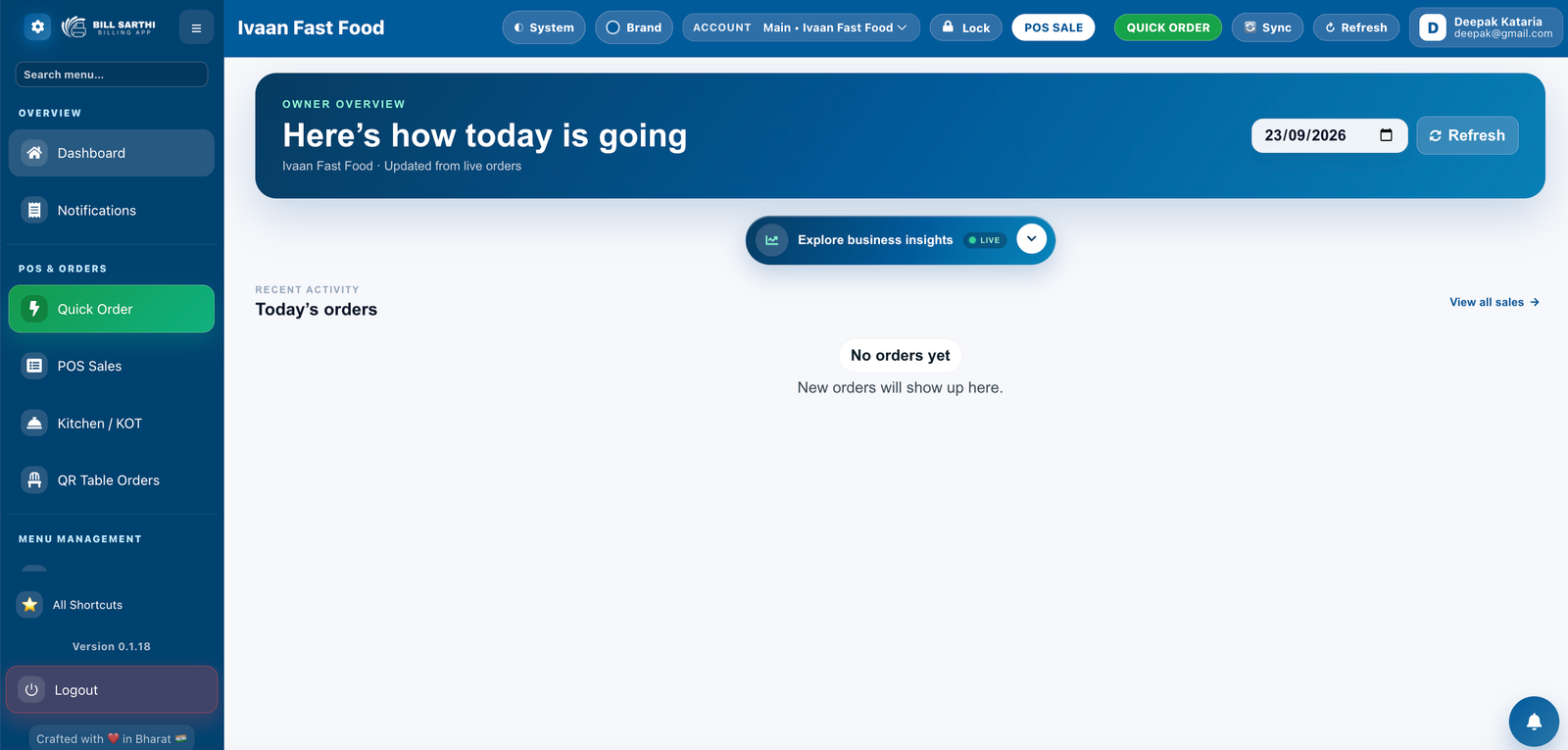
Manage Your Restaurant From One Simple Dashboard
Quickly access everyday restaurant operations such as Quick Order, POS Sales, Kitchen/KOT, QR Table Orders, notifications, sales activity, insights and account controls.
Run Bill Sarthi on the Devices Your Restaurant Already Uses
Use Bill Sarthi across supported desktop, mobile and web environments without forcing your restaurant into one type of device.
Windows 10 & 11
Suitable for main billing counters, cashier systems, back-office work and supported printer-connected setups.
MacBook
Use Bill Sarthi on compatible MacBook systems for restaurant billing and management workflows.
Android & Apple Devices
Use supported Android phones/tablets, iPhone and iPad for flexible restaurant operations.
Web Browser
Access supported restaurant management workflows through the Bill Sarthi web application.
GST Restaurant Billing Made Simple
Bill Sarthi supports GST-ready restaurant billing so taxes can be handled as part of the normal billing workflow.
- GST billing and tax calculations
- CGST and SGST workflows
- GSTIN details on invoices
- Item-wise tax configuration
- GST-ready printable bills
- Discounts within restaurant billing
- Tax and sales reporting workflows
Accept Cash, UPI & Card — Even in the Same Bill
Bill Sarthi supports multiple payment modes so cashiers can clearly record mixed-payment transactions.
Split Payment: one bill is paid using more than one payment method. Split Bill: the bill itself is divided into separate amounts, customers or items.
Everything Your Restaurant Needs to Keep Running
Bill Sarthi is not just an offline billing tool. It is a restaurant POS platform built for everyday operations, staff control and better business visibility.
Offline Billing Support
Create bills, receipts, takeaway orders and dine-in invoices during connectivity problems.
KOT Management
Send or print kitchen order tickets so chefs receive clear item-level order details.
Table Management
Manage dine-in tables, running orders and customer seating with better control.
Inventory Tracking
Track stock movement and improve visibility into restaurant inventory.
Staff Roles
Give cashiers, managers and owners the right access for day-to-day operations.
Reports & Insights
View sales, payment, item, cash activity and performance reports.
Customer Management
Maintain useful customer details and improve repeat customer handling.
Multi-Payment Records
Record cash, card, UPI and mixed payment modes clearly for settlement tracking.
QR Table Orders
Support restaurant table-order workflows using Bill Sarthi's QR Table Orders feature.
Who Needs Offline Restaurant POS Billing Software?
Offline POS is useful for any food business where billing, orders and customer service should not stop because of weak internet.
Restaurants & Cafes
Keep dine-in, takeaway and counter billing smooth.
Cloud Kitchens
Maintain billing and kitchen order flow during connectivity drops.
Bakeries & Sweet Shops
Keep fast counter billing moving when customers are waiting.
Highway Dhabas
Operate more reliably in areas with inconsistent internet.
Food Courts & QSRs
Reduce billing delay during high-volume order periods.
Multi-Outlet Brands
Give outlets more continuity during local internet issues.
Works With Common Restaurant Billing & Kitchen Printers
Bill Sarthi is designed for practical restaurant printing setups used at billing counters and in kitchens.
58mm Printers
Useful for compact receipt printing.
80mm Printers
Common for restaurant customer bills and counters.
USB & Bluetooth
Flexible options for supported desktop and mobile setups.
LAN / Kitchen Printers
Suitable for supported KOT and kitchen workflows.
Internet-Dependent POS vs Bill Sarthi Hybrid Offline POS
A hybrid POS reduces dependency on constant internet connectivity while still keeping connected access and cloud synchronization available.
| Feature | Internet-Dependent POS | Bill Sarthi Hybrid POS |
|---|---|---|
| Billing during internet outage | May stop or become unavailable | Designed to continue supported local billing workflows |
| Restaurant data | Primarily cloud dependent | Essential data kept locally + hybrid cloud sync |
| KOT and kitchen flow | May depend on connectivity | Supports local restaurant KOT workflows |
| Payment records | Depends on system architecture | Cash, UPI, card and split-payment records |
| Windows support | Depends on provider | Windows 10 and Windows 11 |
| MacBook support | Depends on provider | Supported |
| Cloud access | Yes | Yes, alongside offline-capable local operation |
| Offline reliability | Limited in cloud-only systems | Hybrid offline + cloud design |
Restaurant POS at ₹4,000/Year
Run your restaurant with billing, KOT, GST billing, inventory, table management, reports, split payments and hybrid offline + cloud synchronization.
Switching to Bill Sarthi Is Simple
Add basic business details and restaurant settings.
Configure items, categories, pricing and tax settings.
Prepare the POS for your actual restaurant workflow.
Create a test bill and KOT, then start daily restaurant operations.
What to Check Before Buying Offline Restaurant POS Software
Before choosing any offline POS, ask practical questions that match your restaurant's daily operations.
- Can billing continue without internet?
- Is essential restaurant data kept locally on the system?
- What happens when internet connectivity returns?
- Can bills and receipts print offline?
- Can KOT work with your printer setup?
- Does it support Windows 10 and Windows 11?
- Can it be used on MacBook?
- Does it support GST billing?
- Can cash, UPI and card payments be recorded?
- Does it support split payments?
- Can inventory, tables and reports be managed?
- Is setup support available for your restaurant team?
Frequently Asked Questions About Offline Restaurant POS
Does Bill Sarthi work without internet? ⌄
Is restaurant data kept locally on the system? ⌄
What happens when the internet comes back? ⌄
Can I print customer bills offline? ⌄
Can KOT work without internet? ⌄
Does Bill Sarthi support GST billing? ⌄
Can I record UPI + cash or cash + card in the same bill? ⌄
Does Bill Sarthi support Windows 10 and Windows 11? ⌄
Can I use Bill Sarthi on a MacBook? ⌄
Which other devices are supported? ⌄
Which restaurant printers can I use? ⌄
How much does Bill Sarthi restaurant POS cost? ⌄
Keep Restaurant Billing Running Even Without Internet
Use Bill Sarthi for offline-capable restaurant billing, local data availability, hybrid cloud sync, GST billing, KOT, tables, inventory, split payments and reports — from ₹4,000/year.