Do you want to run your restaurant POS on Web in a browser?
Bill Sarthi Web POS is built for daily restaurant operations: quick billing, KOT for kitchen coordination, table management for dine-in, QR code scanner ordering, digital menu, printing workflow, payment mode selection, discounts, customer details, and AI product photo generation.
Support: support@billsarthi.com • Phone: 9988777409
What problems does Web POS solve for restaurants?
Web POS helps when billing slows down at the counter, staff coordination becomes manual, and dine-in operations start feeling messy during busy hours.
- Faster billing using a larger screen, quicker item search, and a cleaner workflow
- Smoother kitchen coordination using KOT instead of manual follow-up
- Better dine-in control using table-wise orders and service visibility
- Modern ordering experience using QR ordering and a digital menu
5
Star Rating
10,000+
Restaurants
120+
Reviews
What does the Bill Sarthi Web dashboard look like in real use?
This is the actual Web POS dashboard. It is designed for speed, clarity, and daily restaurant workflows like quick billing, KOT, tables, printing, and payments.
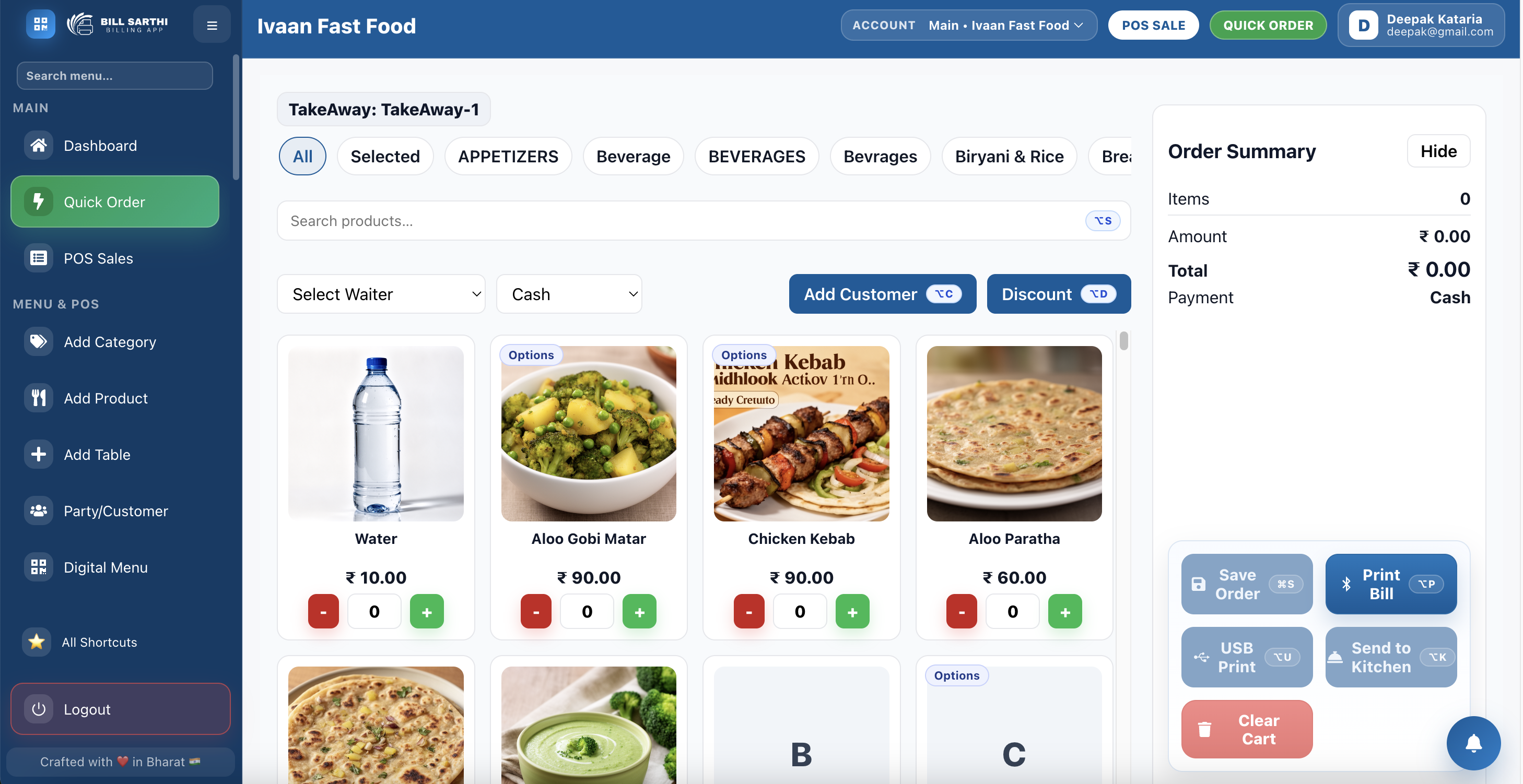
What can staff do faster from this screen?
- Quick billing during peak rush hours
- Send KOT to kitchen for better coordination
- Manage dine-in tables with clarity
- Apply discounts and add customer details when needed
- Select payment mode and close bills consistently
- Use printing workflow for counter operations
Bill Sarthi Digital Menu Preview for Customers
This is the digital menu experience restaurants can share through QR or direct links. It helps customers browse categories clearly, view item photos, and order with more confidence.
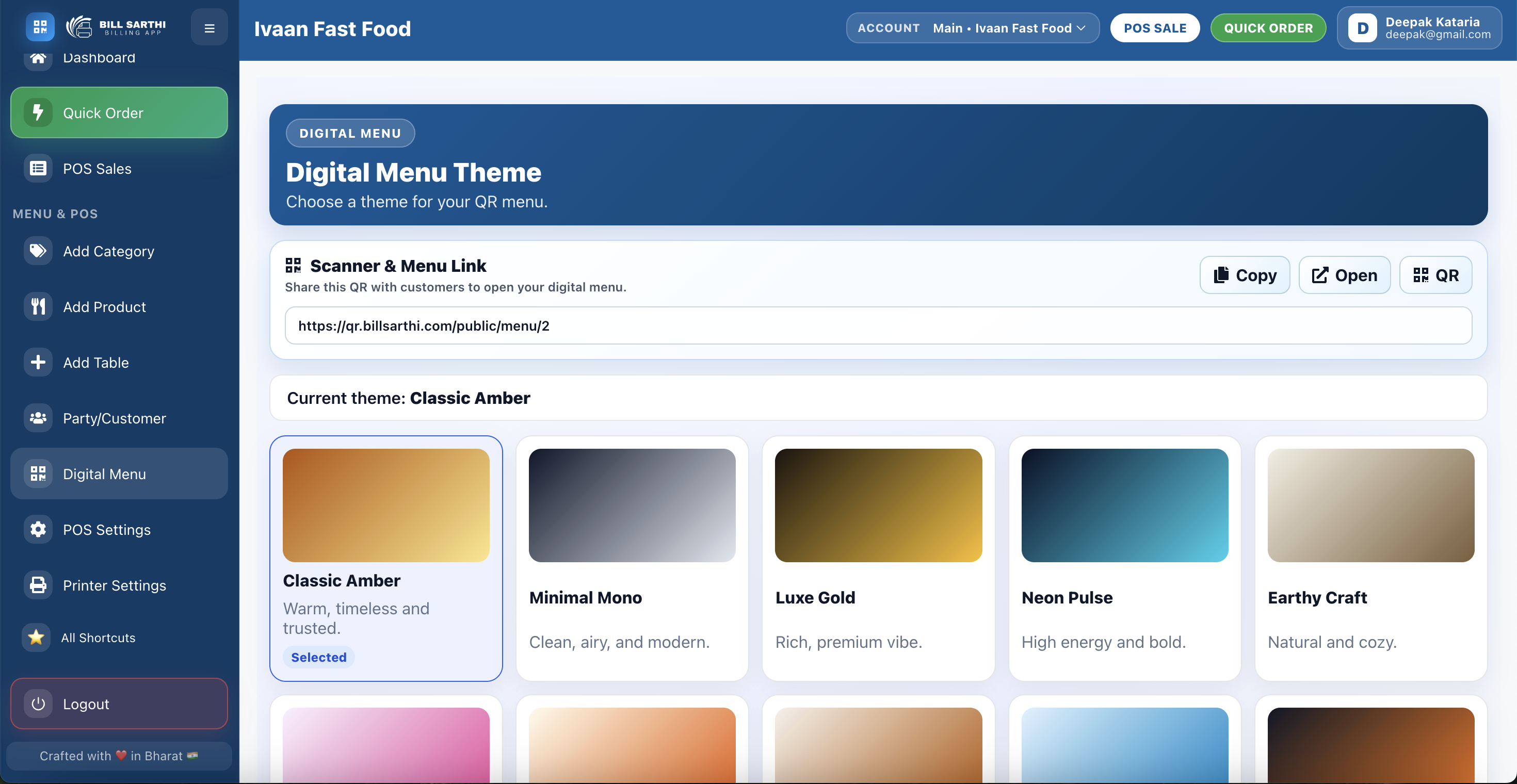
How this digital menu helps restaurants
- Show categories, item pricing, and product photos in a cleaner customer-facing format
- Reduce repeated staff questions by letting customers browse at their own pace
- Support QR-based ordering flow for dine-in tables and modern service operations
- Improve ordering confidence with better menu presentation and item visibility
- Give the restaurant a more professional experience than static printed menus alone
Bill Sarthi QR Code Scan and Order Flow for Customers
Customers can scan the QR code, open the menu on their phone, browse items, and place orders more smoothly without waiting for a printed menu or repeated staff assistance.
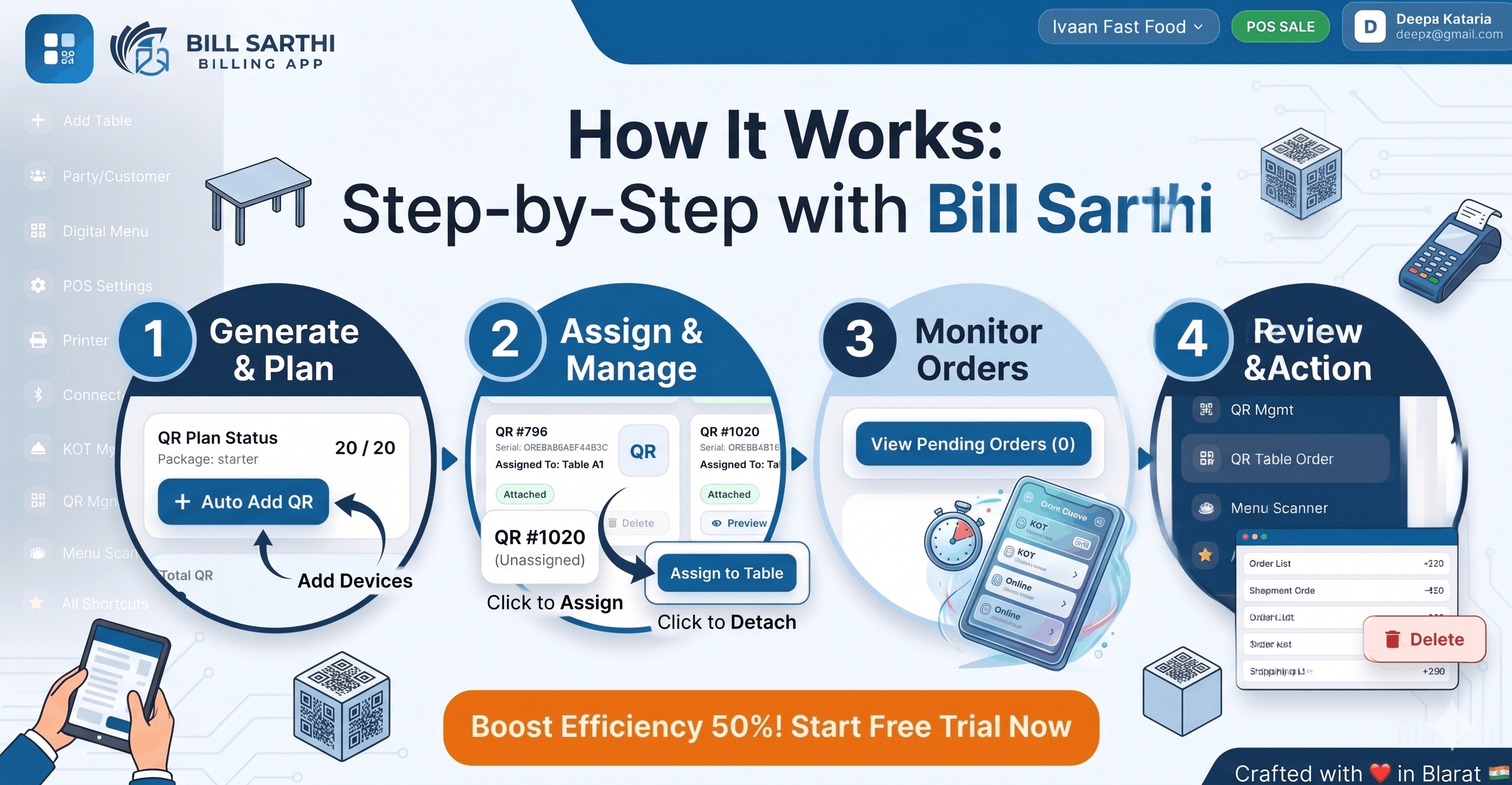
How QR ordering improves the customer experience
- Customers can open the menu instantly by scanning from their table
- Ordering becomes faster because menu browsing and selection happen on the phone
- Staff workload drops when fewer basic menu questions need manual handling
- Restaurants can present categories, pricing, and visuals in a cleaner digital format
- It supports a more modern dine-in flow for busy restaurants and cafes
Bill Sarthi Kitchen Order Management System Preview
This kitchen order management view helps restaurants send orders clearly to the kitchen, track preparation flow, and reduce missed or delayed items during service.
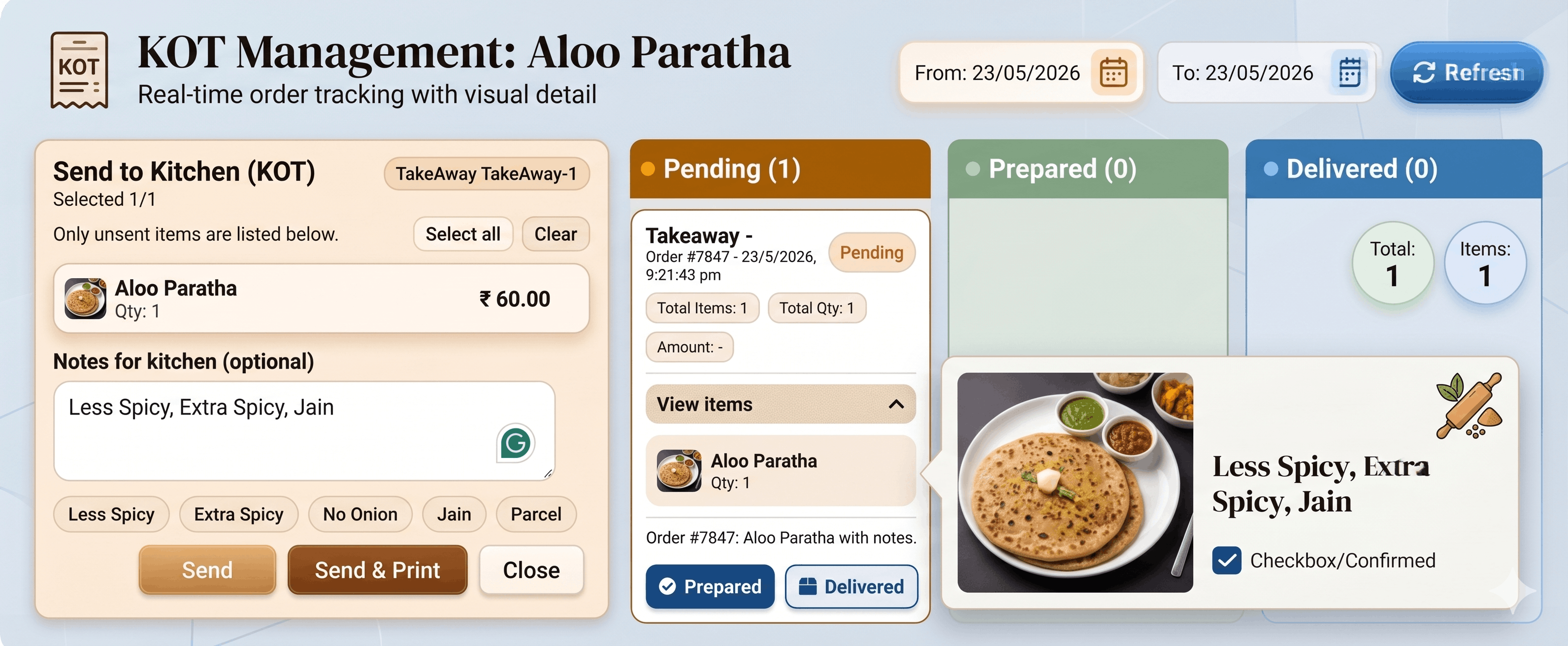
How kitchen order management improves restaurant operations
- Send KOT to the kitchen in a clearer format for faster preparation handoff
- Reduce missed items and confusion during peak order volumes
- Help kitchen staff stay aligned with live order flow from the counter or tables
- Improve coordination between billing, service staff, and the kitchen team
- Support more reliable preparation and dispatch during busy dine-in operations
Bill Sarthi Customer Management for Restaurant Operations
This customer management view helps restaurants keep customer details organized, review order history more easily, and build a cleaner service workflow for repeat guests and ongoing relationships.
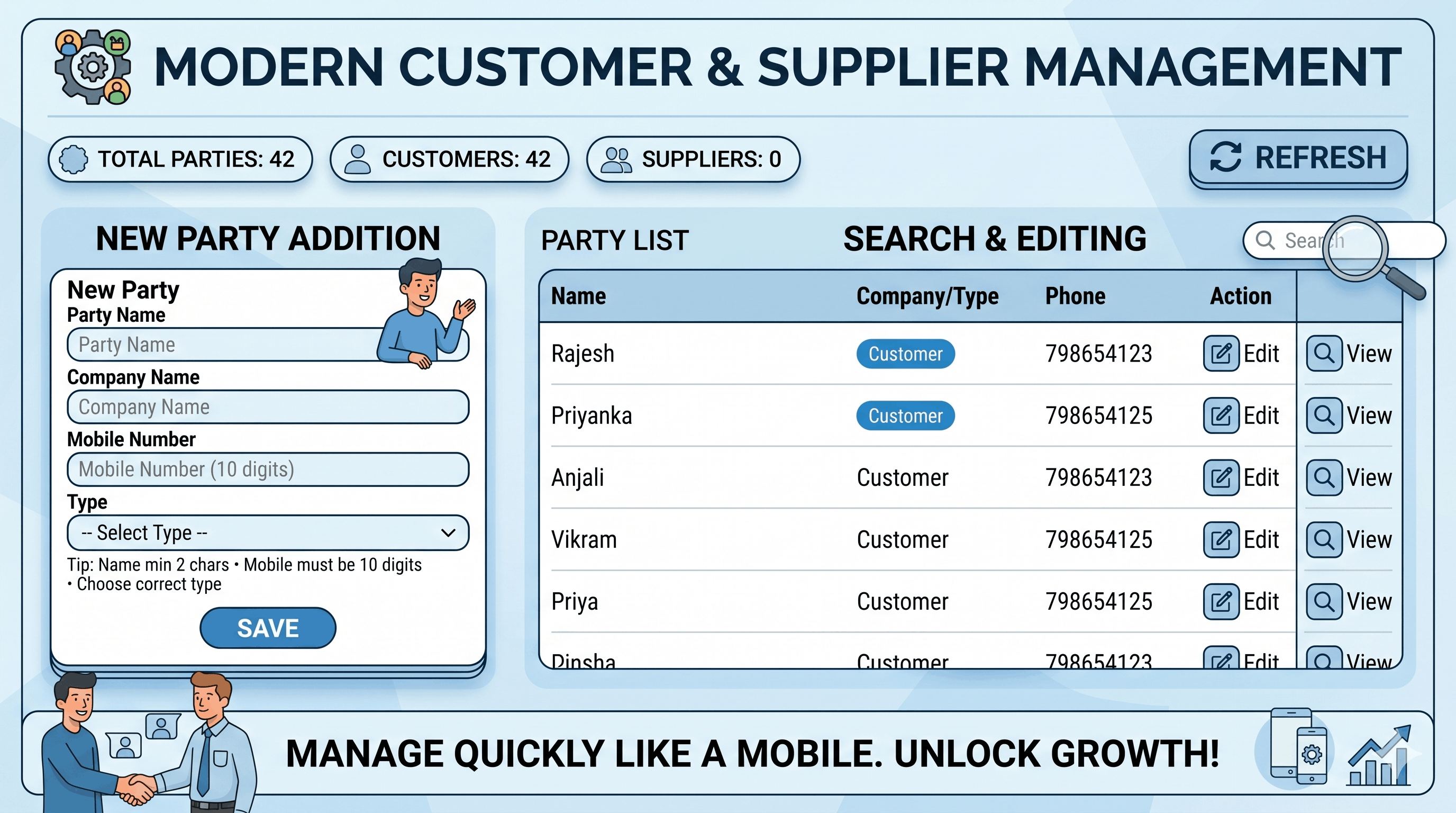
How customer management helps restaurants stay organized
- Store customer details in one place instead of relying on manual notes or memory
- Review customer history more quickly during repeat orders or follow-up service
- Support smoother communication for dine-in, takeaway, and returning guests
- Make discounts, preferences, and customer-linked billing easier to manage
- Help teams build a more professional relationship flow with regular customers
Bill Sarthi Khatabook and Credit Tracking for Restaurants
This khatabook view helps restaurants manage customer dues, track pending balances, and keep credit records organized without depending on manual notebooks or scattered notes.
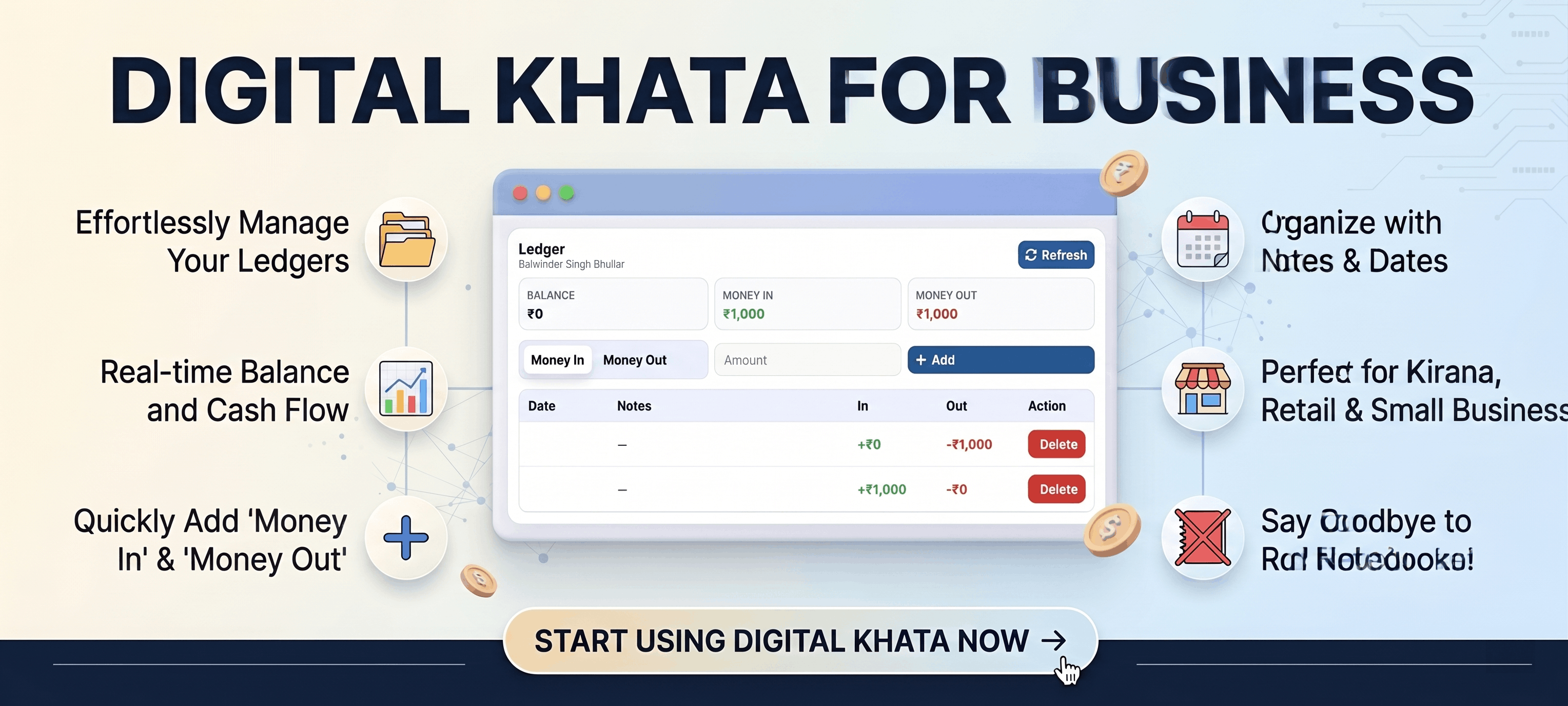
How khatabook helps restaurants manage customer balances
- Track pending customer payments in one place instead of using manual credit notes
- Keep a clearer record of who owes what and which payments are still open
- Reduce follow-up confusion for teams handling repeat customers or local credit billing
- Support smoother recovery of dues with more organized customer-level records
- Give owners a cleaner way to manage ledger-style restaurant payments and balances
Bill Sarthi Report Hub for Restaurant Insights
This report hub gives restaurants a clearer view of sales, order activity, and business performance so owners and managers can review operations without depending on manual summaries.
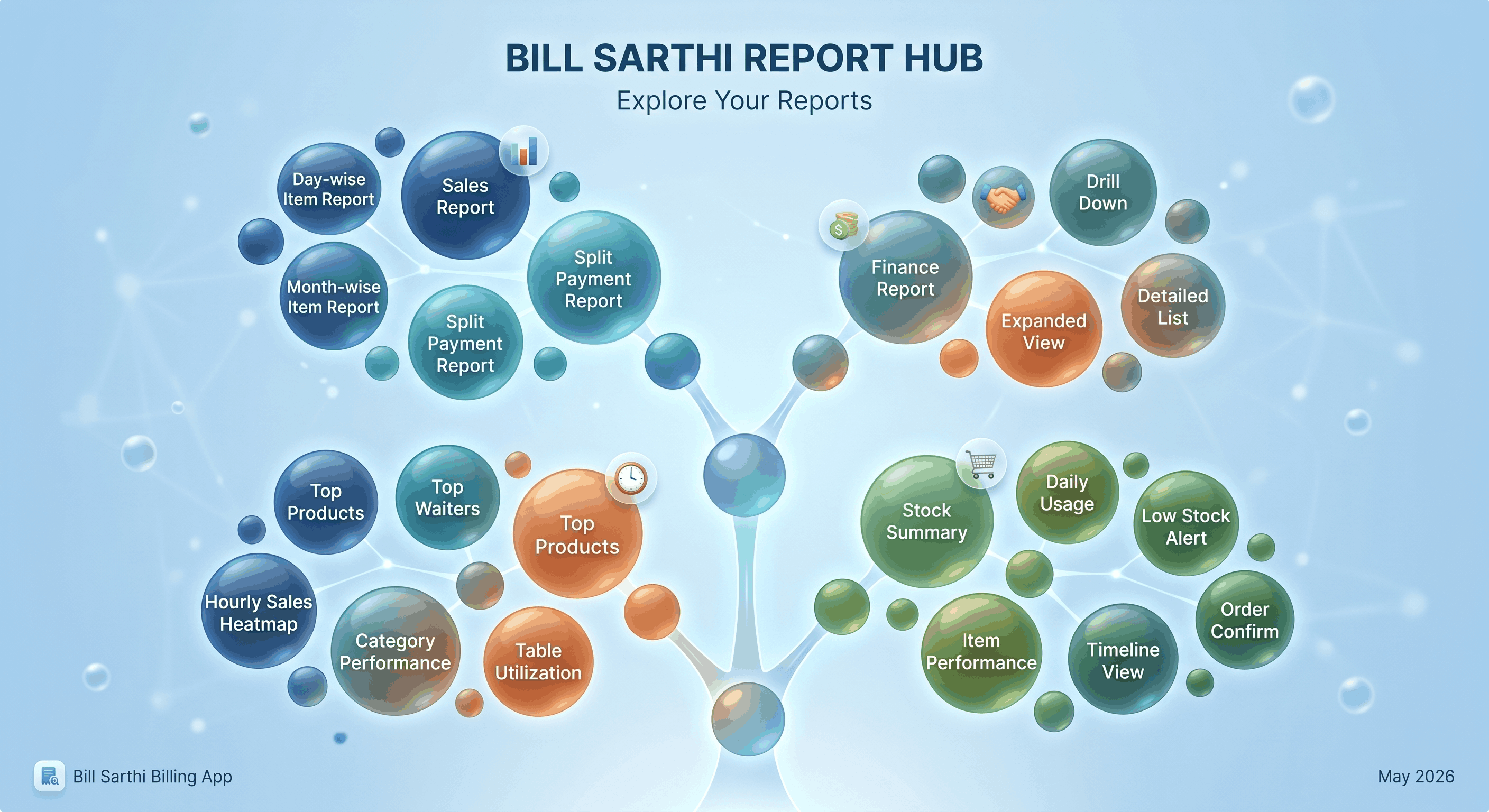
How the report hub helps restaurant owners and managers
- View business performance in one place instead of checking multiple sources manually
- Track sales trends, order activity, and operational numbers with more clarity
- Help owners review daily performance faster and identify issues earlier
- Support better decisions for staffing, billing flow, and restaurant operations
- Make reporting easier for multi-shift teams that need quick business visibility
Why do restaurants choose a Web POS instead of only mobile billing?
Web POS is ideal when you want a bigger screen, faster workflows, and more control. Many restaurants use Web at the counter and mobile for flexibility.
Common pain with basic setups
- Billing depends on one device
- Small screens slow down item selection
- Mistakes happen during rush hours
- Kitchen coordination becomes manual
- Table tracking gets confusing in dine-in
What Web POS improves
- Quick billing with clearer workflow
- KOT for kitchen coordination
- Table management for dine-in flow
- Payment mode selection at checkout
- Digital menu + QR ordering options
Which Web POS features reduce daily stress the most?
This section covers the most common operational pain points: speed, accuracy, kitchen flow, dine-in tables, modern ordering, and better menu presentation.
Does quick billing reduce rush-hour queues?
Yes. Quick billing reduces steps and helps staff close bills faster during peak hours.
Does KOT improve kitchen coordination?
Yes. KOT helps kitchen teams receive clear tickets and reduces missed items.
Does table management simplify dine-in service?
Yes. Table management keeps orders tied to tables and improves service clarity.
Does printing workflow improve counter operations?
Yes. Printing support helps smooth customer checkout and reduces disputes.
Can you apply discounts and add customer details at checkout?
Yes. Discounts and customer details can be handled during checkout when needed.
Does payment mode selection make closing easier?
Yes. Payment mode selection helps staff close bills consistently.
Does QR code scanner ordering reduce mistakes?
Yes. Scanning-based order capture can reduce manual entry and speed up order flow.
Do digital menu and AI photos improve ordering confidence?
Yes. A clean digital menu and better item visuals help customers choose faster.
Want a workflow recommendation for your restaurant type?
Get a guided suggestion for quick billing, KOT, tables, printing, QR ordering, and digital menu.
How does Web POS work from order to bill?
A practical end-to-end workflow that covers quick billing, dine-in tables, kitchen tickets (KOT), payments, and printing.
Step 1: Start billing with quick flow
Select your flow and begin with fast item selection for rush hours.
Step 2: Manage tables or take quick orders
Use table management for dine-in or quick ordering for counter style operations.
Step 3: Send KOT to kitchen
Use KOT to keep kitchen prep aligned with the order.
Step 4: Apply discount or add customer details
Make changes only when required—without disrupting the flow.
Step 5: Select payment mode
Close bills consistently using payment mode selection.
Step 6: Print and finish
Use printing workflow for counter operations and close the checkout.
Which restaurant use-cases fit Web POS best?
Web POS is especially helpful when speed and clarity matter—rush hours, dine-in tables, kitchen coordination, and modern ordering experience.
Fast counter billing
Quick billing helps reduce queues and improve checkout speed.
Dine-in table service
Table management keeps service organized and reduces confusion.
Kitchen-heavy operations
KOT keeps kitchen coordination clean and reduces missed items.
QR ordering experience
QR scanner ordering can reduce manual entry and speed up order capture.
Digital menu upgrade
Digital menu keeps presentation clean and easier to update.
Better menu visuals
AI product photo generation helps create stronger item visuals.
Is Web POS free to start, and when should you upgrade?
Start with ₹0 for information and limited access. Upgrade to ₹5,999/year when full usage is required for daily operations.
What is ₹0 best for?
- Understanding the web workflow and exploring features
- Checking if quick billing, KOT, tables, and QR flow fit your needs
- Evaluating the system before upgrading
When is ₹5,999/year the right upgrade?
- When you need full usage for daily billing operations
- When your staff needs consistent access for workflows
- When you want to run the complete setup regularly
FAQs: What do restaurants ask about Web POS?
Questions about quick billing, KOT, tables, QR ordering, digital menu, printing, payments, discounts, AI photos, and pricing.
Ready to start using Bill Sarthi on Web?
Start with ₹0 limited access, then upgrade to ₹5,999/year when full usage is required.
Start on Web
Use the official Web POS link below to log in and begin.
Support: support@billsarthi.com • Phone: 9988777409